
The best AI automation tools are not interchangeable. A platform that is excellent for connecting SaaS apps may be a poor fit for automating legacy desktop software, building reliable AI agents, or testing an AI-powered product.
This guide compares practical options by use case so you can choose based on the work you actually need to automate.
Key Takeaways
- Choose the workflow first, then the tool. Start with the trigger, data, decisions, actions, exceptions, and approvals you need.
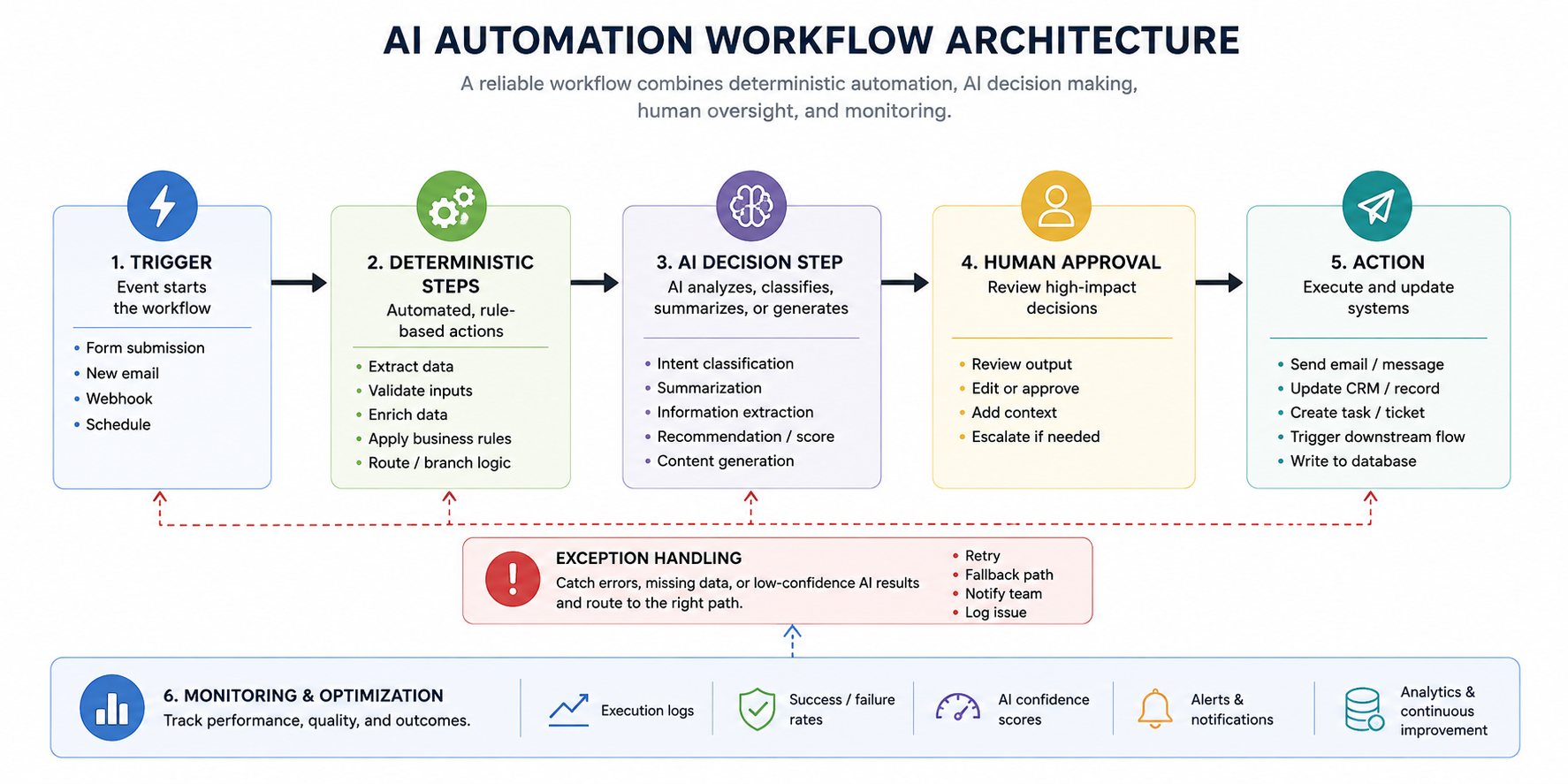
- Use deterministic automation for predictable rules and add AI only where the workflow needs language understanding, classification, generation, or judgment.
- Evaluate integrations, governance, monitoring, technical effort, and cost at realistic task volume before rolling automation across a team.
What Makes an AI Automation Tool Useful for Business?
An AI automation tool connects systems and executes work with limited manual intervention. The AI layer becomes useful when a workflow includes unstructured information, such as emails, documents, call transcripts, support tickets, or free-form lead data.
Traditional automation works well when the rules are stable: when a form is submitted, create a CRM record and notify sales. AI can extend that flow by summarizing the submission, classifying intent, checking it against criteria, or drafting a response.
That difference matters because not every repetitive task needs AI. Adding a model to a simple rule-based process can introduce more cost, variability, and monitoring work without improving the outcome.
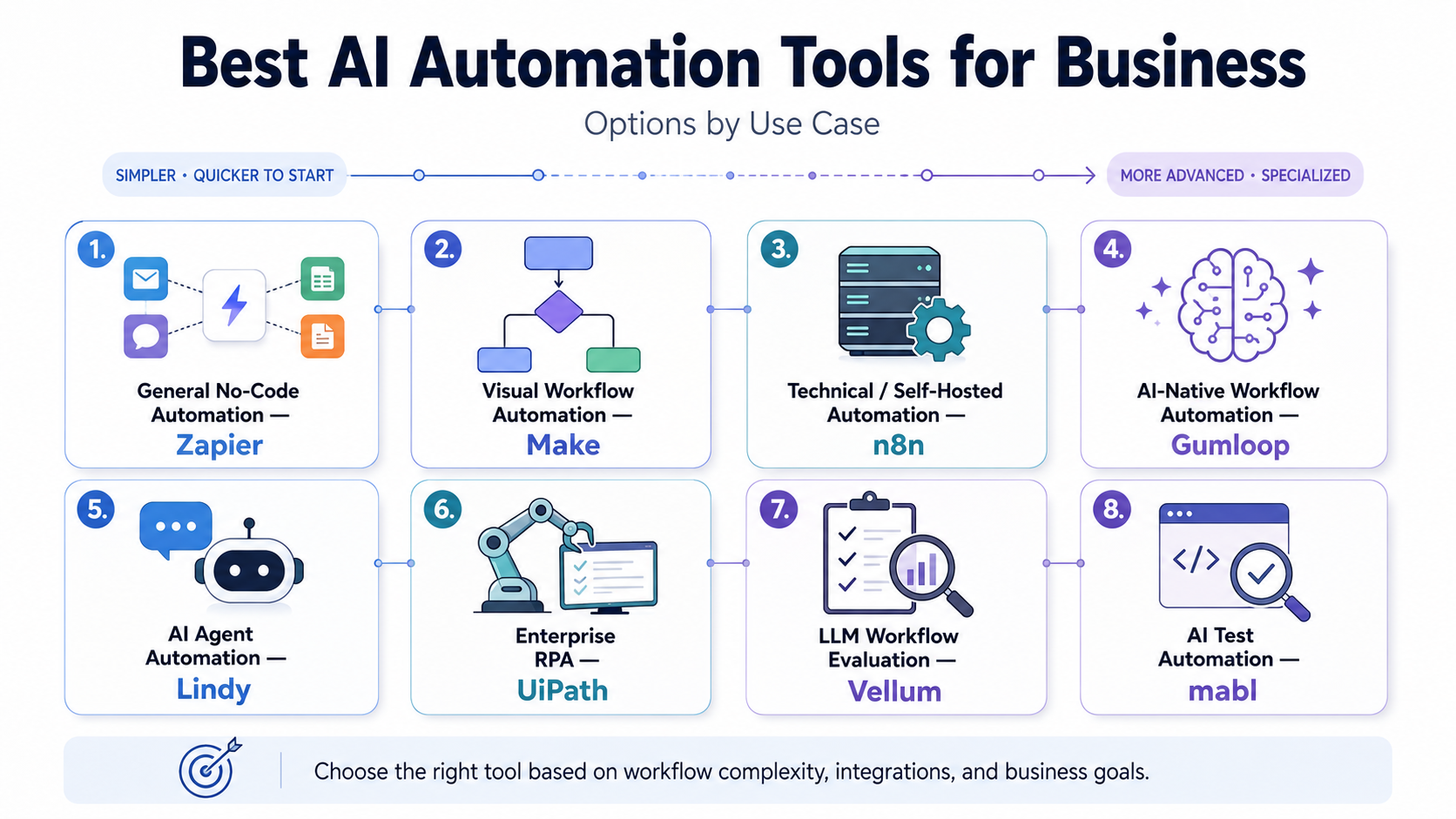
Best AI Automation Tools by Use Case
|
Use case |
Strong option |
Why it fits |
|
General no-code business automation |
Zapier |
Broad app connectivity and accessible workflow building |
|
Visual, multi-step workflow orchestration |
Make |
Strong visual mapping, branching, and data movement |
|
Technical teams and self-hosting |
n8n |
Flexible workflow logic and self-hosted deployment options |
|
AI-native cross-functional workflows |
Gumloop |
AI agents and automations built around business tasks |
|
Sales, inbox, meeting, and admin agents |
Lindy |
Natural-language agent building for common business work |
|
Enterprise RPA and legacy interfaces |
UiPath |
UI automation for desktop, virtual, and enterprise systems |
|
Building and evaluating LLM workflows |
Vellum |
Workflow development plus structured evaluation tools |
|
AI-assisted software testing |
mabl |
AI-native test creation, execution, and maintenance |
The right choice depends less on which platform has the longest feature list and more on where your process sits between fixed rules and judgment-heavy work.
Zapier: Best for General No-Code Business Automation
Zapier is a practical starting point when your main problem is connecting common business apps and automating predictable handoffs. Its current platform combines no-code workflows with AI steps, agents, and human approval options across a large integration ecosystem.
A typical use case might start with a website form, enrich the lead, classify the request, create or update a CRM record, draft a reply, and notify the right salesperson.
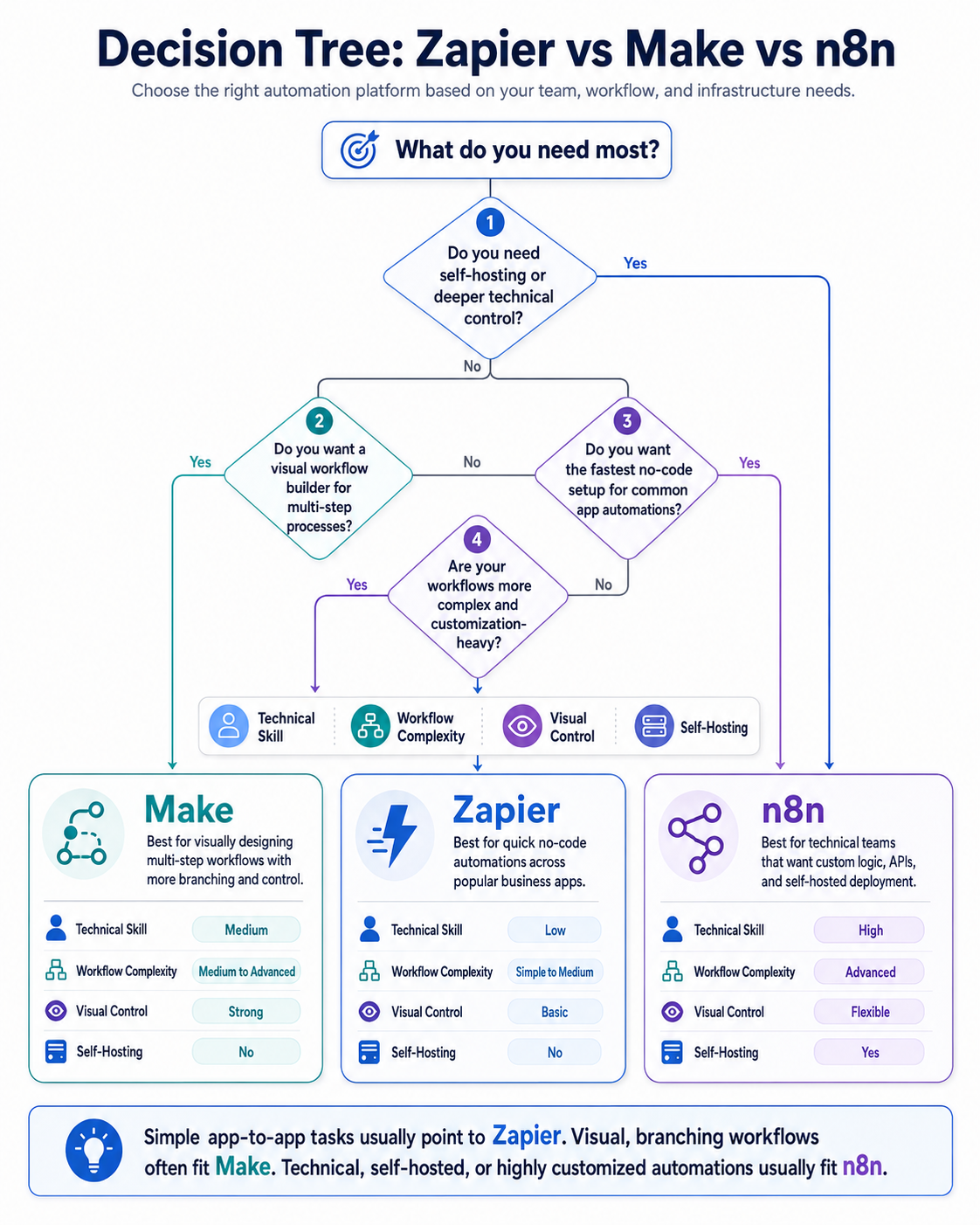
Choose Zapier when accessibility and connector coverage matter more than deep infrastructure control. For highly custom logic, self-hosting requirements, or complex debugging, a more technical platform may fit better.
Make: Best for Visual Multi-Step Workflows
Make is strong when you want to see a complicated process laid out visually. Its platform supports visual workflows and AI agents, with step-by-step visibility that can help teams understand routing, transformations, and agent decisions.
That makes it useful for operations workflows with several branches. For example, an incoming request could be categorized, routed by customer type, enriched from another system, checked for missing data, and sent through different follow-up paths.
Choose Make when visual orchestration and branching logic are central to the workflow. The trade-off is that large scenarios still need disciplined naming, error handling, and ownership to remain maintainable.
n8n: Best for Technical Teams and Self-Hosted Automation
n8n is a better fit when your team wants more control over workflow logic, APIs, infrastructure, or model access. It supports AI workflows and can be deployed in self-hosted environments, which is useful for teams that want to manage more of the automation stack themselves.
It can handle standard app automation, but its value becomes clearer when a workflow needs custom code, direct API calls, specialized data handling, or technical deployment choices.
Choose n8n when engineering flexibility matters. Do not choose it only because self-hosting sounds attractive. Someone still needs to maintain the environment, credentials, workflow logic, monitoring, and model connections.
Gumloop: Best for AI-Native Cross-Functional Workflows
Gumloop is built around AI agents and automations that can work with internal and external data, recurring triggers, business applications, and multi-agent workflows. Its current positioning covers use cases such as CRM work, support, data analysis, meeting preparation, and content operations.
This makes it worth considering when AI reasoning is central to the process rather than a single step added to a conventional automation.
A marketing workflow, for example, could gather source material, classify it, extract structured insights, draft an asset, and send it to a person for review before publishing or distribution.
Choose Gumloop when non-technical or mixed teams want to build AI-heavy workflows without treating every automation as an engineering project.
Lindy: Best for Sales, Inbox, Meetings, and Administrative Agents
Lindy focuses on AI agents that can respond to triggers, use business data, take actions, and connect with third-party tools. Its documented examples include email triage, CRM updates, meeting notes, follow-ups, lead workflows, and support tasks.
That makes it a good fit for teams that think in terms of delegating recurring knowledge work rather than drawing every workflow node manually.
The important implementation question is where the agent can act independently and where it needs approval. Sending an internal summary may be low risk. Sending a pricing commitment or changing a customer record may require tighter controls.
UiPath: Best for Enterprise RPA and Legacy Systems
UiPath is designed for a different automation problem. It combines AI with robotic process automation, including UI automation that can interact with enterprise applications, desktop interfaces, virtual environments, and legacy systems.
This matters when important work cannot be automated through clean modern APIs. Finance, operations, service, or back-office processes may still depend on software where a bot has to interact with screens much like a person would.
Choose UiPath when you need enterprise-scale process automation across systems that are difficult to connect otherwise. The implementation burden is typically higher than a lightweight no-code workflow, so process stability and governance matter.
Vellum: Best for Building and Evaluating LLM Workflows
Vellum fits product and technical teams building applications where the AI output itself is part of the product or business process. Its evaluation tooling can test prompts and workflows against defined scenarios and metrics, including monitoring deployed LLM applications.
This is different from simply connecting a CRM to an email tool. If your workflow depends on model quality, prompt changes, routing logic, or regression testing, you need a way to evaluate whether a change actually improved the system.
Choose Vellum when AI workflow reliability and evaluation are first-class requirements rather than optional checks.
mabl: Best for AI-Assisted Software Test Automation
mabl is focused on software quality rather than general office automation. Its platform uses AI across the testing lifecycle, including creating tests, running them continuously, and adapting coverage as applications change.
This is useful for product and QA teams that want to reduce repetitive test maintenance while keeping human oversight around critical releases and edge cases.
Choose a specialized testing platform like mabl when the process you are automating is software verification. A general workflow builder can move test results between tools, but it is not a replacement for a purpose-built testing system.
How to Choose the Best AI Automation Tools for Your Business
Start with one workflow, not a company-wide AI mandate. Write down the current process from trigger to final outcome, including every system, handoff, approval, and exception.
Then evaluate tools against six questions:
- What systems must connect? Check the actual CRM, inbox, database, help desk, project platform, or internal API you use.
- Where is AI genuinely needed? Use AI for language, extraction, classification, generation, or variable decisions. Keep stable rules deterministic where possible.
- What can go wrong? Identify bad inputs, duplicate records, model errors, missed triggers, API failures, and actions that should never happen automatically.
- Where should a human approve? Add review before high-impact external messages, financial actions, customer changes, or other sensitive steps.
- Who will maintain it? A workflow without an owner eventually becomes invisible operational debt.
- How will you measure value? Track cycle time, manual touches, error rates, response speed, completion rate, or another metric tied to the original problem.
Avoid Building an Automation Stack You Cannot Operate
Many businesses compare tools before they have mapped the process. That often produces a stack with overlapping platforms, duplicated integrations, inconsistent prompts, and nobody clearly responsible for failures.
A better approach is to begin with one high-friction workflow and prove that it can run reliably. Once the process is stable, reuse the same patterns for credentials, approvals, logging, exception handling, and monitoring.
This is also where AI automation services can be useful. The value is not simply choosing software. It is deciding what should be automated, connecting the right systems, setting boundaries for AI decisions, and creating a workflow that your team can actually maintain.
Start With the Workflow That Creates the Most Friction
The best AI automation tools are the ones that fit your process, technical capacity, risk level, and existing stack. Zapier and Make can simplify common business workflows, while n8n gives technical teams more control.
Agent-focused platforms such as Gumloop and Lindy handle more judgment-heavy work. UiPath, Vellum, and mabl solve more specialized automation problems.
Start with a repetitive workflow that has clear inputs and a measurable outcome. Map it, automate the predictable parts first, add AI only where it improves the process, and keep human review where the cost of a wrong action is high.
If the workflow spans multiple systems or needs more careful design, Rank Boost can help plan and implement the right AI automation approach around the way your business already operates