
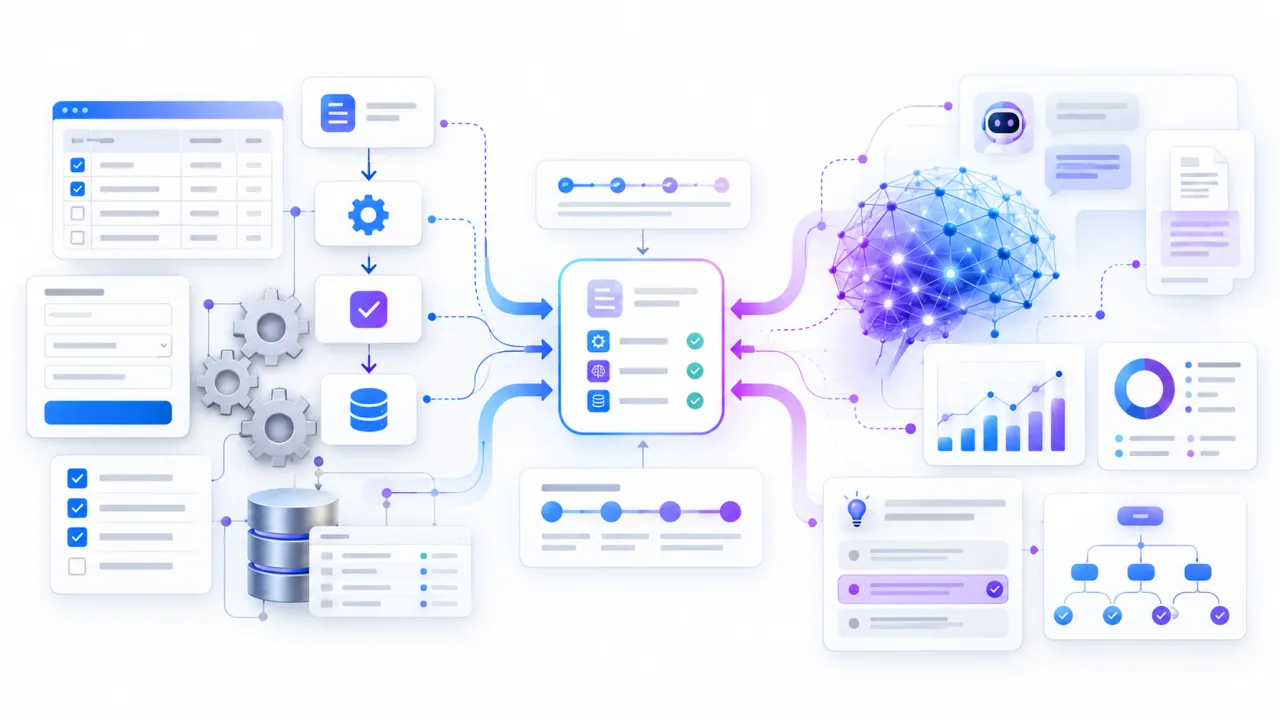
AI vs automation is not a choice between an old technology and a new one. Automation is best at executing clear, repeatable rules, while AI is useful when work requires interpretation, pattern recognition, language understanding, or flexible decisions.
For many businesses, the right answer is not one or the other. It is using the simplest reliable automation for predictable steps and adding AI only where the workflow genuinely needs judgment.
Key Takeaways
- Use rule-based automation when inputs, rules, and outcomes are stable and predictable.
- Use AI when the task involves unstructured data, language, patterns, or context that cannot be handled cleanly with fixed rules.
- Combine AI and automation when a workflow needs both interpretation and dependable execution across business systems.
What Do AI and Automation Actually Mean?
Automation uses technology to perform a task or process with reduced human involvement. In most business workflows, that means a trigger starts a predefined sequence of actions.
For example, when a lead submits a form, an automated workflow can create a CRM contact, assign an owner, send a confirmation email, and notify the sales team. The system does not need to understand the lead. It follows the rules it was given.
This can include workflow automation, business process automation, scripts, integrations, scheduled tasks, and robotic process automation. IBM describes RPA as software that automates repetitive, rules-based business activities. IBM's explanation of robotic process automation
AI works differently. An AI system can analyze data, interpret language, classify information, recognize patterns, generate content, or make predictions based on learned statistical relationships.
That does not mean every AI system "learns" from each interaction after deployment. Many business AI tools use models that were trained previously and then apply those learned patterns to new inputs. The important distinction is that AI can handle inputs that are difficult to express as simple fixed rules.
AI vs Automation: The Key Differences
The easiest way to understand automation vs AI is to compare the type of work each handles best.
| Question | Automation | AI |
|---|---|---|
| Best inputs | Structured | Variable or unstructured |
| Logic | Fixed rules | Model-based inference |
| Output | Repeatable | Context dependent |
| Best for | Predictable tasks | Interpretation and ambiguity |
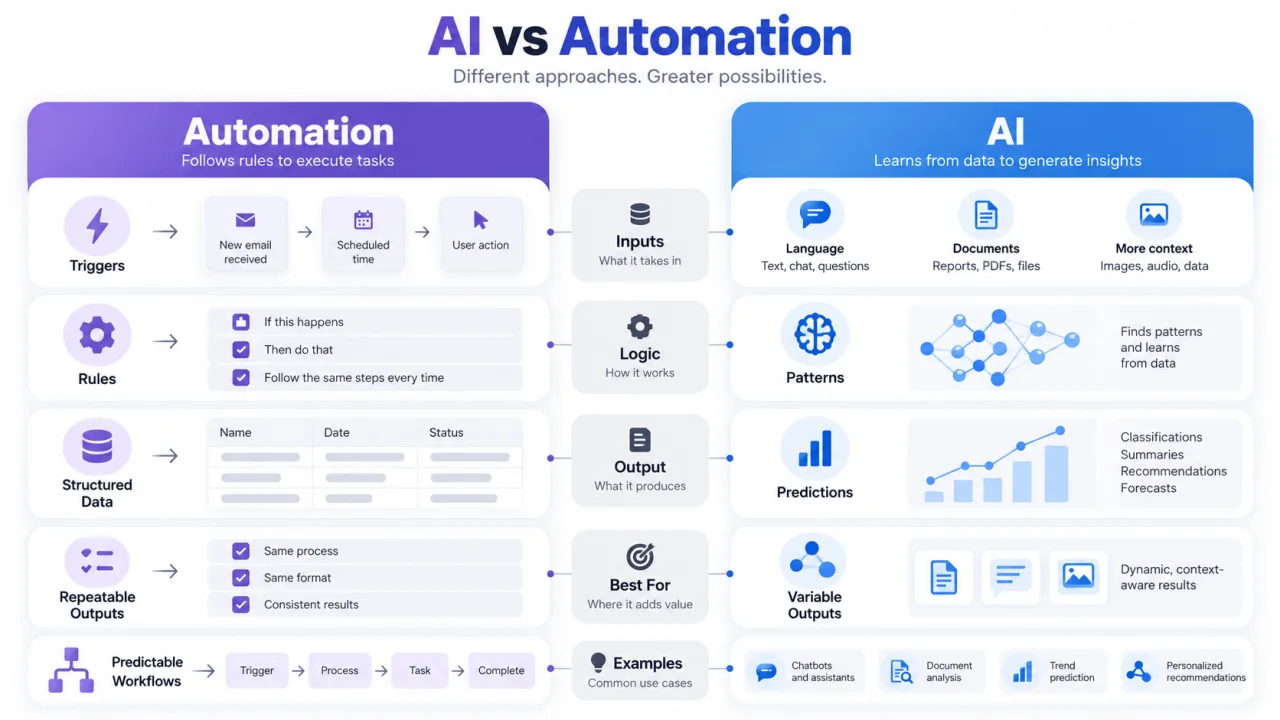
A useful test is to ask whether you can describe the task as: "When X happens, always do Y." If the answer is yes, traditional automation may be enough.
If the task sounds more like, "Read this, understand what it means, then decide what should happen," AI becomes more relevant.
When Should a Business Use Traditional Automation?
Traditional automation is the better choice when the process is stable, the rules are clear, and the desired outcome should be consistent every time.
Typical process automation use cases include:
- Creating a CRM record after a form submission
- Sending reminders after a fixed number of days
- Moving data between approved systems
- Routing an approval based on a dollar threshold
- Generating a scheduled report from structured data
- Updating a customer status after a known event
The advantage is control. A deterministic workflow can be easier to test, audit, debug, and maintain because its behavior is defined in advance.
Businesses sometimes add AI to a process simply because AI is available. That can make a straightforward workflow more expensive and less predictable without improving the outcome.
If a field already contains a clear status such as "qualified," you probably do not need an AI model to decide whether the next sales step should start. A simple rule can do it.
When Should a Business Use AI?
AI becomes useful when the input varies too much for a practical set of fixed rules.
Consider a shared customer-support inbox. Customers can describe the same problem in hundreds of different ways. Building keyword rules for every possible phrase becomes fragile. AI can classify the request by intent, summarize the issue, extract relevant details, or draft a suggested response.
Other strong AI use cases include:
- Classifying free-form emails or support tickets
- Summarizing long documents or conversations
- Extracting meaning from invoices, contracts, or forms with inconsistent layouts
- Scoring or prioritizing leads using multiple signals
- Detecting unusual patterns in operational data
- Generating a first draft from approved context
- Answering questions from a controlled knowledge base
The decision should still depend on risk. A model drafting an internal summary has a different consequence profile from a model approving a payment, changing access permissions, or sending a legal response.
What Is AI Automation?
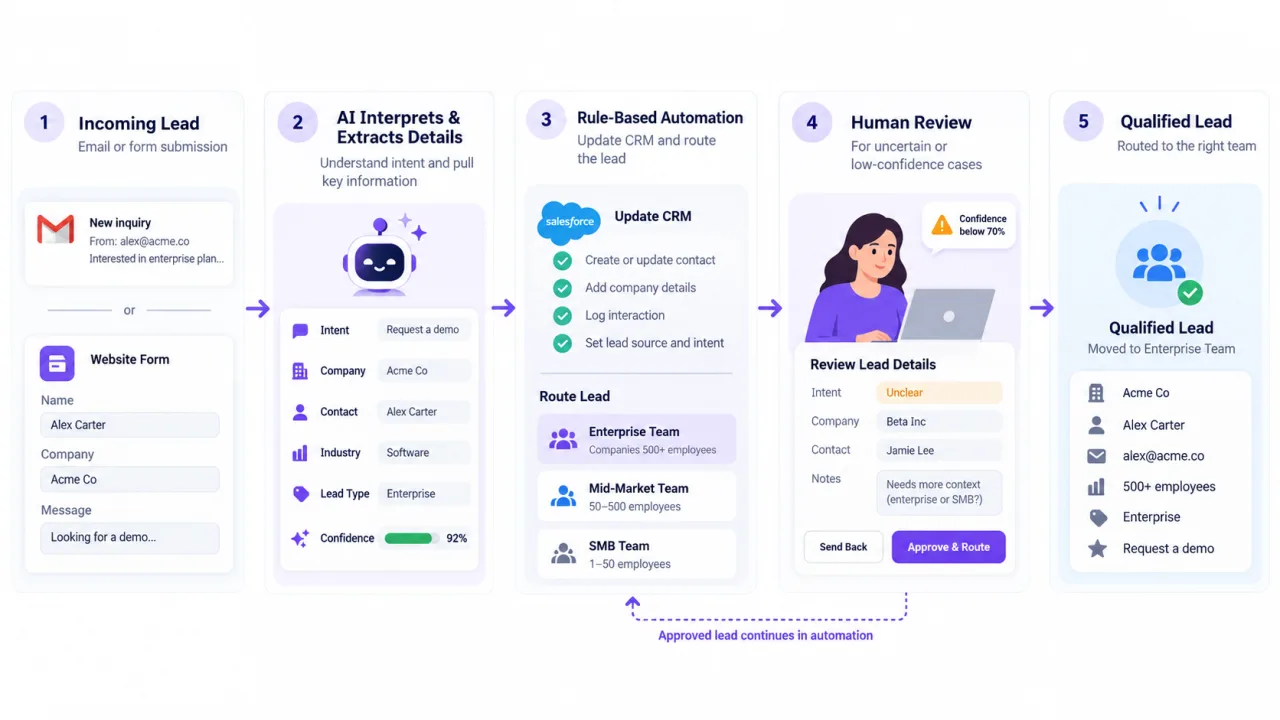
AI automation combines AI's ability to interpret or generate with automation's ability to execute a workflow. It is often the most practical design when one part of a process is ambiguous but the surrounding steps should remain controlled. For a fuller breakdown, see our guide What Is AI Automation?
For example, an incoming sales inquiry may contain unstructured language. AI can identify intent and extract requirements. Automation can then create the CRM record, assign the correct pipeline stage, notify the right salesperson, and schedule the next task.
This is also commonly described as AI-powered automation or intelligent automation. The exact terminology varies, but the useful design principle is consistent: give AI the parts that require interpretation, and give deterministic automation the parts that require reliable execution.
AI vs Automation Examples Across Business Teams
The distinction becomes clearer when you map both approaches to real workflows.
- Sales: Automation assigns leads by territory; AI interprets inquiry intent; a hybrid workflow can qualify, route, and create follow-up tasks.
- Marketing: Automation schedules campaigns; AI drafts audience-specific copy; a hybrid workflow can send only approved variants.
- Support: Automation sends acknowledgments; AI classifies and summarizes requests; a hybrid workflow can route each ticket.
- Operations: Automation triggers approvals; AI analyzes exceptions; a hybrid workflow can flag unusual cases for review.
- Reporting: Automation gathers scheduled data; AI summarizes changes; a hybrid workflow can produce a draft explanation for human review.
The hybrid pattern is often stronger because it separates probabilistic work from deterministic work. AI handles ambiguity. Automation handles the repeatable path. Humans handle exceptions, approvals, and decisions where accountability matters.
How to Choose Between Automation vs AI
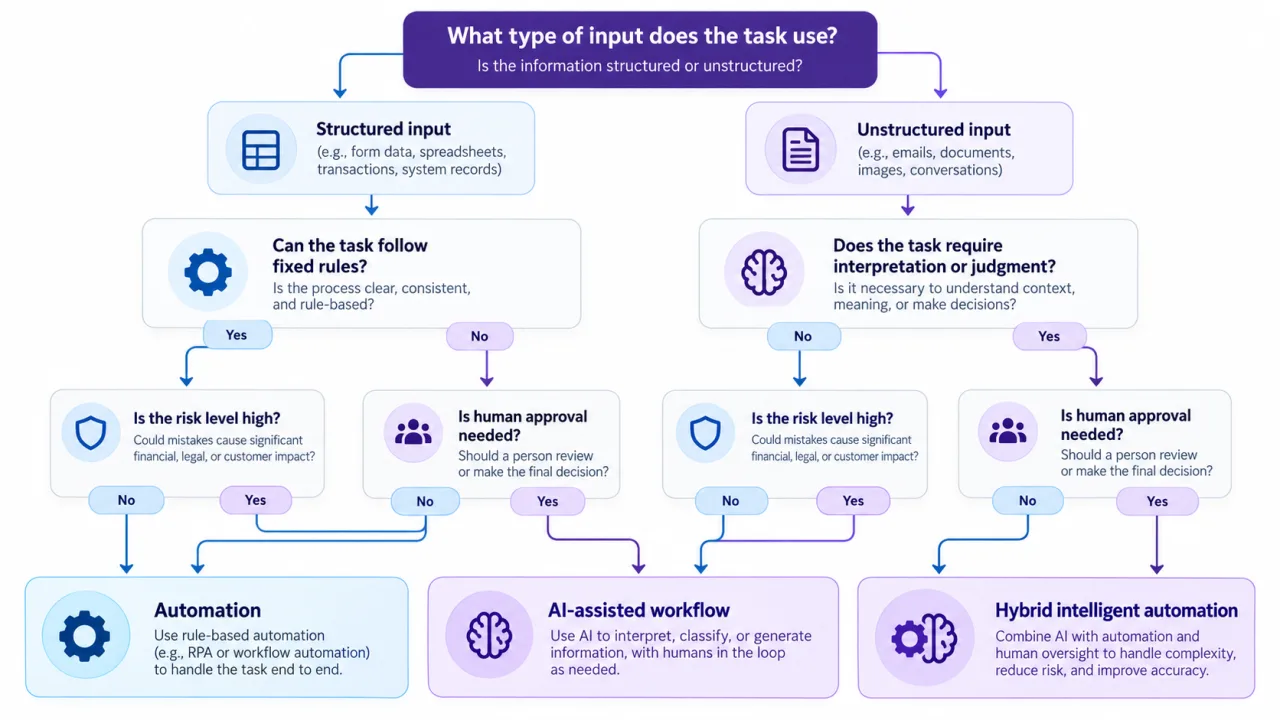
Do not start by asking which technology is more advanced. Start with the workflow. Once the workflow is clear, choosing between automation tools becomes much easier.
Use this six-question decision framework.
1. Are the inputs structured?
If the system receives fixed fields, known statuses, standard numbers, or consistent events, automation is usually enough.
If it receives emails, documents, conversations, images, or inconsistent text, AI may be useful.
2. Can the decision be written as a reliable rule?
If the decision can be expressed with clear conditions, use rules first.
If someone currently needs to interpret meaning, compare context, or recognize a pattern, AI may reduce manual work.
3. Does the output need to be identical every time?
Use automation when consistency is essential. AI outputs can vary, so they need stronger testing and controls when variation creates risk.
4. What happens when the system is wrong?
A low-risk draft can often tolerate more AI autonomy. A high-impact action may need approval, confidence thresholds, validation rules, or a human reviewer.
NIST's AI Risk Management Framework emphasizes governance, measurement, risk management, and clear human roles when organizations deploy AI systems.
5. Does the workflow already work manually?
Do not automate confusion. Map the current trigger, inputs, decisions, actions, exceptions, systems, and owner before selecting tools.
A broken process can become a faster broken process after automation.
6. Can you solve most of the problem without AI?
Use the least complex system that solves the requirement. Add AI where it creates a clear capability that rules cannot deliver efficiently.
Common Mistakes When Businesses Implement AI or Automation
The first mistake is overengineering. A team sees a repetitive task and assumes it needs AI when a trigger, condition, and action would solve it more reliably.
The second mistake is the opposite. Teams build increasingly complicated rules around a problem that fundamentally requires interpretation. Hundreds of keyword conditions are often a sign that a classification problem may be better suited to AI.
Another mistake is allowing AI output to trigger high-impact actions without safeguards. AI-powered automation should define what the model can decide, what must be validated, when a human must approve, and what happens when confidence is low.
Finally, businesses often focus on the model and ignore the surrounding systems. The value usually depends on integrations, permissions, data quality, workflow ownership, exception handling, and monitoring as much as the AI itself.
Where AI Automation Services Fit
AI automation services are most useful when a business has already identified a repetitive or high-friction workflow but needs help deciding which parts should use rules, AI, integrations, and human review.
A practical implementation often starts with one process. Map it, automate the predictable steps, introduce AI only where it adds needed interpretation, and measure whether the new workflow is more reliable and useful than the manual version.
That approach can scale into broader intelligent automation without forcing AI into every task.
FAQs
Is AI the same as automation?
No. Automation follows predefined rules to execute tasks, while AI can interpret variable inputs, identify patterns, generate outputs, or make model-based predictions. They can be used separately or combined in one workflow.
Can automation work without AI?
Yes. Many valuable workflows use no AI at all. Rule-based automation can handle notifications, approvals, data transfers, scheduled tasks, CRM updates, and other predictable processes efficiently.
Is AI automation better than traditional automation?
Not automatically. AI automation is better when the workflow genuinely requires interpretation or flexible handling. Traditional automation is often preferable when rules are stable and the business needs consistent, predictable execution.
Start With the Workflow, Not the Technology
The best AI vs automation decision is usually the simplest one that solves the business problem reliably. Use automation for predictable execution, AI for interpretation, and a hybrid approach when the process needs both.
If you are evaluating a workflow for Rank Boost, start by mapping the trigger, data, decisions, exceptions, and human approvals. That makes it much easier to determine whether you need straightforward automation, AI, or a controlled combination of the two.