
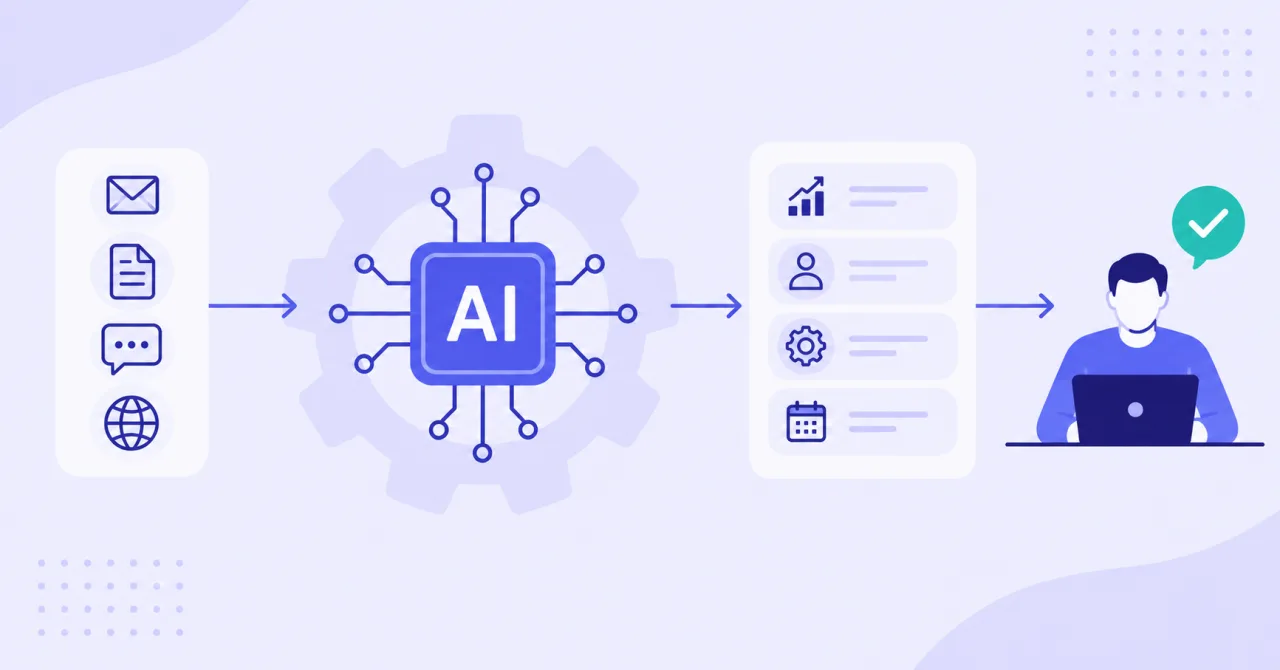
What is AI automation? It is the use of artificial intelligence inside automated business workflows so systems can interpret information, make limited decisions, generate outputs, and trigger actions with less manual effort.
Unlike basic rule-based automation, it can work with less structured inputs such as emails, documents, conversations, and customer requests.
For businesses, the useful question is not whether AI can automate work. It is where AI adds enough judgment or interpretation to improve a process without creating unnecessary risk or complexity.
Key Takeaways
- Start with repetitive workflows that have clear triggers, inputs, outputs, and owners before adding more AI autonomy.
- Use AI for interpretation, classification, extraction, prediction, or generation, while using standard automation for predictable system actions.
- Keep human review for high-impact decisions involving customers, money, compliance, sensitive data, or public-facing outputs.
What Is AI Automation in Business?
AI automation combines artificial intelligence with workflow automation. Traditional automation follows predefined instructions. AI adds the ability to interpret context, recognize patterns, process unstructured information, or generate a useful response before the next workflow step happens.
A simple example is lead routing. A standard workflow might send every form submission to one sales queue. An AI-enabled workflow can read the inquiry, identify the service requested, classify urgency, summarize the lead, and then route it to the right person.
The AI does not need to control the whole process. In many reliable systems, AI handles one judgment-heavy step while normal automation manages CRM updates, notifications, assignments, data movement, and approvals.
This distinction matters because AI automation should solve a process problem, not add intelligence to every task just because the technology is available.
AI Automation vs. Traditional Automation
Traditional automation is best for stable tasks with clear rules. AI automation is more useful when the workflow includes language, documents, images, changing context, or other inputs that are difficult to handle with fixed conditions.
|
Approach |
Best suited for |
Typical behavior |
|
Rule-based automation |
Predictable repetitive work |
Executes predefined conditions |
|
RPA |
Repetitive actions inside software |
Mimics clicks, typing, and data entry |
|
AI automation |
Work requiring interpretation |
Uses AI inside a defined workflow |
|
Agentic automation |
Dynamic multi-step work |
Can choose actions or tools within guardrails |
The practical rule is simple: use the least complex method that reliably completes the task. If an if-then rule can solve the problem, adding a language model may increase cost and maintenance without improving the outcome.
AI becomes valuable when a person currently needs to read, interpret, categorize, summarize, compare, or generate information before a process can continue.
How Does AI Automation Work?
Most business AI automation can be understood as a sequence of connected steps. Make describes a core pattern of trigger, AI reasoning, and action, while enterprise automation guidance adds data, governance, monitoring, and human oversight around those steps.
1. A trigger starts the workflow
The process begins with an event. That could be a new lead, incoming email, support ticket, invoice, uploaded document, CRM stage change, website form, or scheduled reporting task.
2. The workflow gathers context
The system collects the information required for the task. That may include CRM history, customer data, product information, previous messages, internal documents, business rules, or approved knowledge sources.
Good automation sends only the context needed for the decision. More data is not automatically better, especially when sensitive information is involved.
3. AI interprets the input
The AI layer performs the task that is difficult to express with simple rules. It might classify intent, extract fields, summarize text, detect patterns, draft content, or recommend a next action. AI automation commonly uses machine learning, natural language processing, generative AI, and computer vision for these types of tasks.
4. Business rules control the next step
The AI output should normally be converted into structured information that downstream systems can use. For example, a lead workflow might require service category, urgency, confidence score, summary, and recommended owner.
Rules can then decide whether to continue automatically, request approval, or send the item to an exception queue.
5. Automation executes the action
The workflow updates a CRM, creates a ticket, drafts an email, posts a notification, adds information to a database, creates a task, or triggers another system action.
6. Monitoring and human review manage exceptions
AI outputs can be inconsistent or incorrect. Workflows should log important actions, identify failures, and define what happens when confidence is low or an input falls outside expected conditions. Human-in-the-loop review is especially useful before customer messages, payments, public publishing, or other higher-risk actions.
What Tools Are Used for AI Automation?
Most AI automation is built from several tool categories rather than one application.
Workflow automation platforms
These platforms connect triggers, applications, APIs, logic, approvals, and actions. Examples in the current automation market include Make, UiPath, ServiceNow, Automation Anywhere, and similar workflow or orchestration platforms.
The right platform depends on your integrations, security requirements, workflow complexity, technical resources, and need for monitoring or governance.
AI models and services
The intelligence layer may use large language models, machine learning models, natural language processing, computer vision, speech systems, or predictive models. The right capability depends on whether the task involves text, documents, images, audio, forecasting, or classification.
Business systems and integrations
AI becomes operational when it connects to the systems where work already happens. These may include CRMs, help desks, email platforms, accounting systems, databases, websites, collaboration tools, and internal knowledge bases.
Governance and monitoring tools
Production workflows also need permissions, logs, alerts, validation, version control, and exception handling. Strong AI cannot compensate for unreliable integrations, poor source data, or unclear ownership.
Practical AI Automation Use Cases
The strongest use cases usually combine high repetition with a meaningful interpretation step. Current automation platforms commonly highlight sales, marketing, customer support, finance, document processing, HR, and operations as practical application areas.
Sales and lead management
AI can read inbound inquiries, classify intent, summarize requirements, enrich CRM records, prioritize leads, and prepare follow-up drafts. Standard automation can then assign the record and notify the right rep.
This removes manual sorting while keeping relationship-building and important sales decisions with people.
Customer support
AI can categorize tickets, detect urgency, summarize long conversations, retrieve approved information, and draft responses. Simple requests may continue automatically, while unusual or sensitive cases can be routed to a person.
Marketing operations
Marketing teams can use AI automation for research summaries, content repurposing, campaign briefs, tagging, reporting commentary, and moving information between forms, spreadsheets, CRMs, and publishing systems.
The purpose is not to automate marketing strategy. It is to reduce repetitive coordination and production work around the strategy.
Operations and document processing
AI is useful when employees repeatedly read invoices, applications, order notes, contracts, or intake forms to extract the same types of information.
The workflow can extract fields, apply rules, update a system, and route exceptions for review. UiPath specifically highlights the combination of AI interpretation with automation execution for document-heavy processes.
Finance and administration
Possible workflows include invoice classification, expense categorization, reconciliation support, anomaly flagging, report preparation, and approval routing. Financial actions should always use controls that match the potential business impact.
Benefits of AI Automation
When the workflow is well designed, AI automation can reduce repetitive work, shorten handoffs, make unstructured information easier to process, and improve consistency across high-volume tasks. Major automation providers also emphasize productivity, scalability, faster processing, and improved handling of complex or unstructured inputs.
The biggest advantage is often not full automation. It is removing a manual interpretation bottleneck between two systems or teams.
For example, a support employee may no longer need to read every ticket just to decide where it belongs. A sales rep may receive a structured summary instead of manually reviewing a long form submission. An operations team may review only document exceptions rather than every document.
These improvements still depend on process quality. Automating a poorly defined workflow can simply make the same problems happen faster.
Risks and Limitations to Plan For
AI automation introduces different failure modes from traditional automation. Data quality, system integration, security, governance, costs, and organizational adoption are recurring implementation challenges in current enterprise guidance.
Common risks include inaccurate outputs, inconsistent classifications, sensitive data exposure, weak access controls, integration failures, and employees trusting an AI recommendation without enough review.
Not every process should be fully automated. High-stakes decisions involving legal rights, financial commitments, compliance, safety, or sensitive customer outcomes usually need stronger controls and human accountability.
Teams should also define what happens when the AI is uncertain. A useful workflow does not only describe the success path. It includes fallback rules, exception queues, approval steps, and an owner who can investigate failures.
How to Choose Your First AI Automation Process
Start with the workflow, not the tool. AWS recommends identifying strong business use cases, governance, infrastructure needs, data requirements, and measurable outcomes as part of AI automation readiness. Make similarly emphasizes selecting processes that occur frequently and involve interpretation of unstructured inputs.
A simple evaluation framework is:
- Frequency: Does the task happen often enough to justify automation?
- Clarity: Can you define the trigger, required input, output, and owner?
- Interpretation: Does someone repeatedly read, classify, summarize, or extract information?
- Risk: Can mistakes be detected before they cause serious harm?
- Integration: Can the required systems exchange data reliably?
- Measurement: Can you compare the new workflow against a baseline such as processing time, backlog, error rate, or response speed?
Start with one narrow process. Test normal cases, unusual inputs, missing information, and failure paths. Measure what changes. Then decide whether to expand the workflow, add more AI capability, or keep the process intentionally simple.
Build the Process Before Adding More AI
AI automation works best when it removes a specific bottleneck inside a well-understood business process. Clear triggers, reliable data, limited AI reasoning, deterministic actions, monitoring, and appropriate human review are usually more valuable than maximum autonomy.
If your team needs help identifying the right workflow, connecting systems, and designing practical controls, Rank Boost's AI automation services can help turn a repetitive process into a structured automation plan.
Start with one high-friction workflow, validate it, and expand from evidence rather than hype