
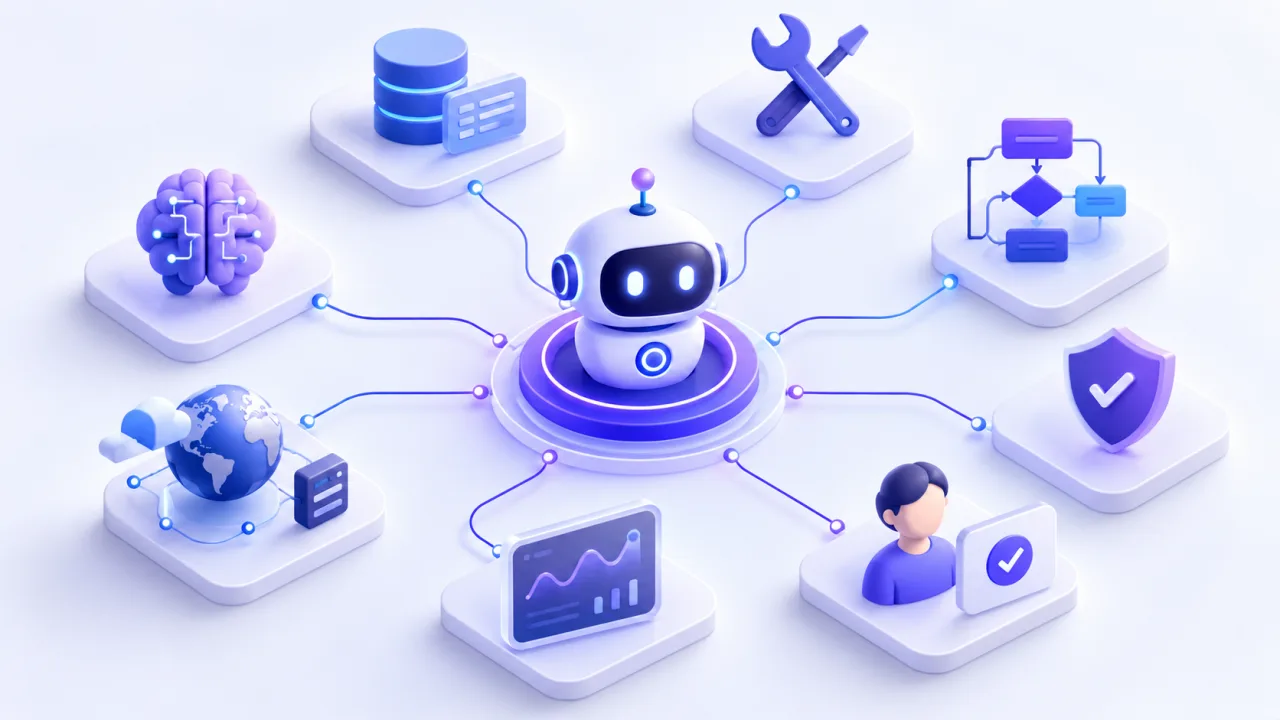
Learning how to build an AI agent is less about choosing the newest model and more about designing a reliable system around a clear job. That is especially true for AI agents for business, where the agent has to work with real systems and data. A useful agent needs instructions, tools, data, boundaries, feedback, and a runtime that can decide what to do next.
This guide explains the architecture, tool choices, and practical build process for creating an agent that can move beyond chat and complete multi-step work.
Key Takeaways
- Start with one bounded business outcome and a clear definition of success before selecting models or frameworks.
- Design tools, permissions, memory, guardrails, and human approvals as part of the architecture, not as afterthoughts.
- Test the full workflow with realistic inputs, failures, and edge cases before increasing autonomy or adding more agents.
What Is an AI Agent?
An AI agent is a system that uses an AI model to decide how to complete a task, choose from available tools, observe results, and continue until it reaches a stopping condition. The important difference is that the model helps control workflow execution rather than only generating a response.
OpenAI describes agents as systems that independently accomplish tasks and use tools to gather context or take actions. It also distinguishes agents from simple chatbots or single-turn model calls that do not control workflow execution.
A practical agent usually works as a loop: receive a goal, decide the next action, call a tool if needed, inspect the result, then continue or stop. That tool-calling loop is the smallest useful foundation of an agent.
That means not every AI automation needs to become an agent. If a workflow always follows the same predictable rules, standard workflow automation may be simpler, cheaper to maintain, and easier to audit.
AI Agent Architecture: The Core Components
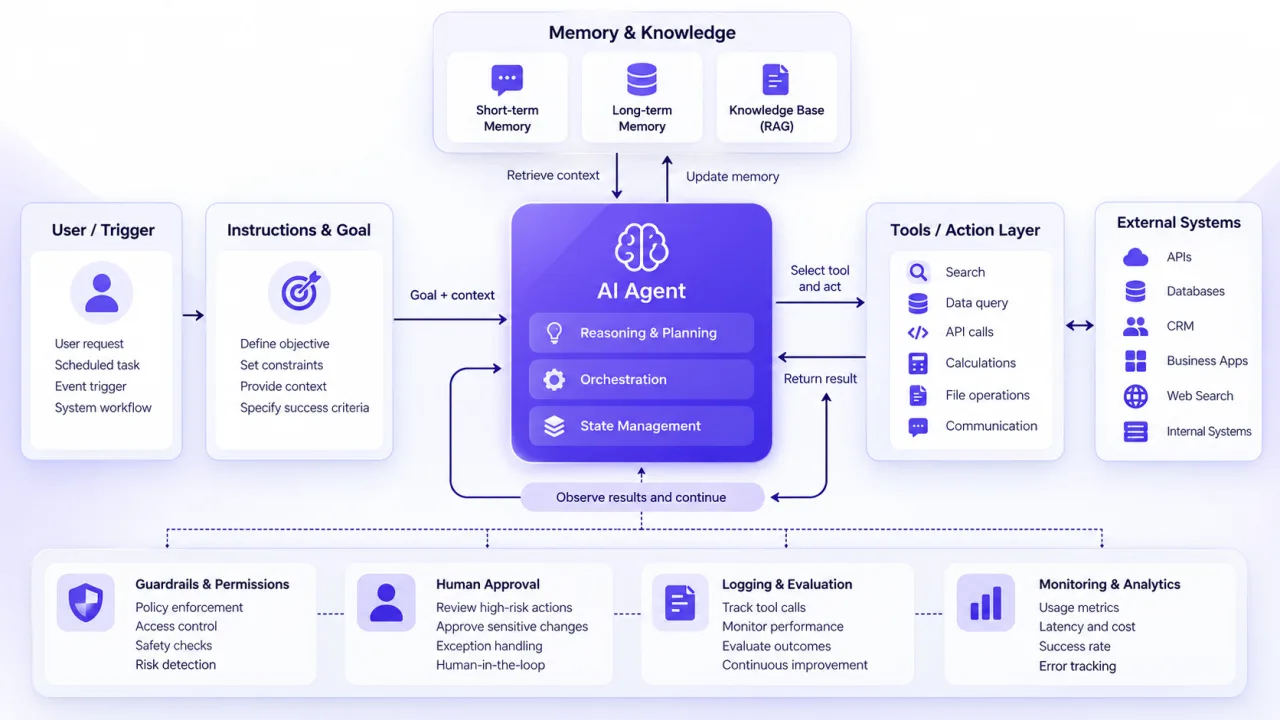
A production-minded agent is more than an LLM connected to an API. OpenAI's practical framework highlights three foundational components: model, tools, and instructions. Other AI agent architectures add state, memory, orchestration, evaluation, and guardrails around that core.
Model and reasoning layer
The model interprets the goal, evaluates context, and chooses the next step. Model selection should match the difficulty of the decisions being made, not just the desire to use the most capable option everywhere.
A useful pattern is to establish a quality baseline first, then test whether smaller or faster models can handle simpler subtasks without reducing acceptable performance.
Instructions and operating rules
Instructions define the agent's role, goals, allowed behavior, required outputs, escalation rules, and stopping conditions. Strong instructions reduce ambiguity and give the runtime clearer guidance when the workflow reaches an exception.
Treat these instructions like an operating procedure. Include what the agent should do, what it must not do, and what should happen when information is missing.
Tools and actions
Tools are how the agent interacts with the outside world. They may retrieve CRM records, search a knowledge base, calculate values, update a database, send a message, create a ticket, or call another service.
Tool definitions should be narrow and explicit. Clear names, parameters, outputs, permissions, and error behavior make it easier for the model to select the right action and easier for developers to test what happened.
Memory and state
State tracks what is happening during the current run. Memory can preserve useful information across turns or sessions when the use case genuinely requires it.
Do not add long-term memory automatically. Persistent memory creates extra privacy, relevance, retrieval, and data-governance questions. Start with only the state needed to complete the task, then expand if repeated use cases justify it.
Guardrails, approvals, and observability
Agents need controls outside the prompt. Authentication, authorization, limited tool permissions, validation, approval gates, logs, and execution limits help reduce the impact of a bad decision.
OpenAI recommends layered guardrails alongside standard security controls, while recent NVIDIA security guidance emphasizes access control, sandboxing, network restrictions, and protected secret management for higher-risk agent deployments.
How to Build an AI Agent Step by Step
The strongest build process moves from workflow design to controlled execution. Do not start by wiring ten tools to a model. Start by defining exactly what success looks like.
1. Define one job and a measurable outcome
Write the agent's job in one sentence. For example: "Review new inbound leads, enrich missing company data, recommend a priority level, and send uncertain cases to a sales manager for review."
Then define success. Useful measures might include completion rate, accuracy, escalation rate, response time, user acceptance, or time removed from a repetitive process. IBM similarly recommends defining purpose and performance measures before making technical choices.
2. Decide whether the workflow really needs an agent
Use an agent when the task requires judgment, interpretation of unstructured information, dynamic tool selection, or handling many possible paths.
Use deterministic automation when the steps are fixed. A form submission that always creates a CRM record and sends the same notification does not need autonomous reasoning.
3. Choose a single-agent or multi-agent design
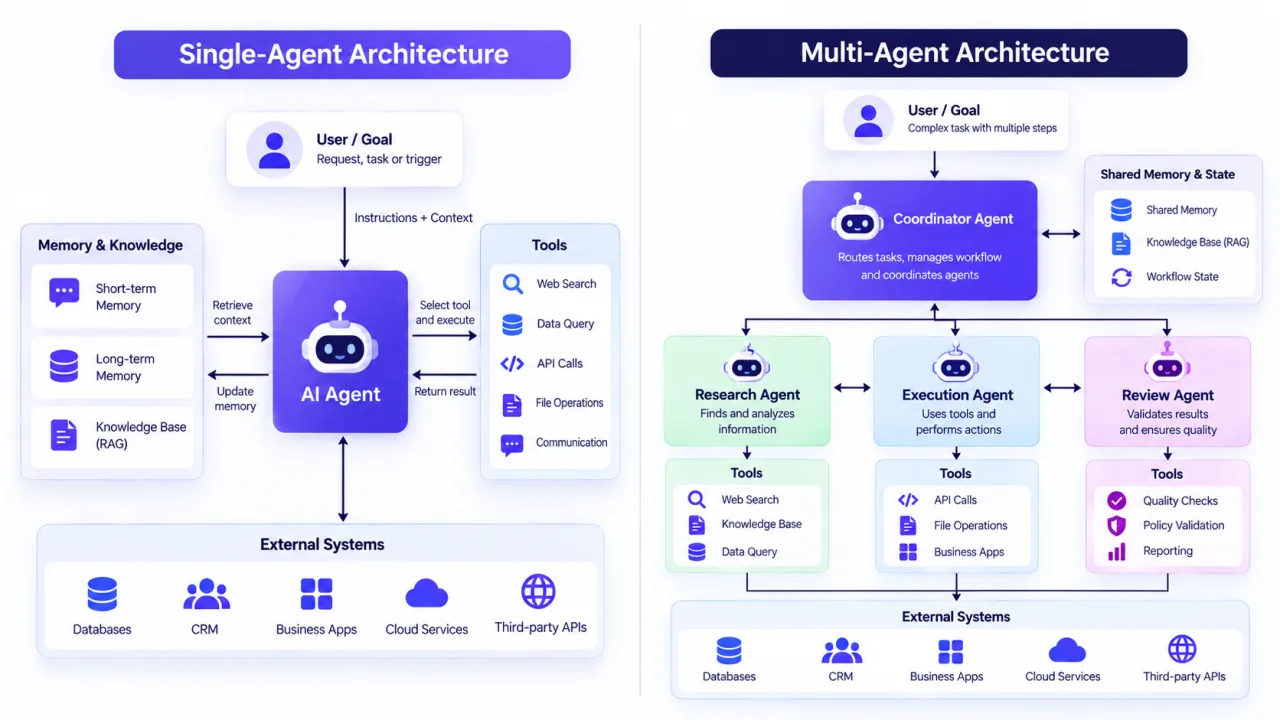
Start with one agent unless there is a clear reason to separate responsibilities. A single agent with well-defined tools is easier to test, observe, and maintain.
OpenAI recommends maximizing a single agent first and moving to multiple agents when complex instructions or overlapping tools make performance harder to manage.
Multi-agent patterns become useful when specialized roles need different tools, permissions, context, or review responsibilities. One agent might research, another validate, and a manager agent might decide when the workflow is complete.
4. Select the model, framework, and runtime
Choose the stack based on control, engineering resources, integrations, state requirements, and deployment environment.
A custom API loop gives maximum control. Agent frameworks reduce boilerplate. Low-code workflow platforms can speed up business integrations. Stateful orchestration frameworks become useful when a workflow needs durable state, branching, resumability, or human intervention.
5. Design the tools before giving the agent access
List every action the agent may need. For each tool, define inputs, outputs, authentication, permissions, timeout behavior, retries, and what happens when the operation fails.
Prefer least-privilege access. A lead research agent may need to read CRM records without being allowed to delete them. A content agent may create drafts while requiring approval before publishing.
6. Write instructions, examples, and escalation rules
Give the agent a clear objective, operating constraints, tool guidance, output format, and definition of done. Add examples for ambiguous cases and explicitly describe when the agent should ask for help.
Include edge cases early. If required data is missing, should the agent search another source, ask the user, skip the record, or escalate to a person? That decision should not be improvised in production.
7. Implement the execution loop and state
The runtime sends the current context and available tools to the model. If the model requests a tool, the application executes it, returns the result, and lets the model decide what happens next.
The loop should have exit conditions such as successful completion, a required human approval, an error, or a maximum number of steps. Without stop conditions, an agent can waste calls or repeat unsuccessful actions.
8. Add human approval for consequential actions
Not every tool call needs a person, but actions with financial, legal, customer, publishing, deletion, or account-level consequences often deserve an approval gate.
Human-in-the-loop design is not a failure of autonomy. It is a control mechanism that lets the agent handle routine reasoning while people retain authority over higher-impact decisions.
9. Evaluate, deploy, and monitor the workflow
Test more than the happy path. Use realistic tasks, incomplete inputs, conflicting data, unavailable tools, incorrect tool outputs, ambiguous requests, and attempts to push the agent beyond its authorized role.
Track the full execution path, not just the final answer. You need to know which tools were called, what data was returned, how many steps were taken, where failures occurred, and whether humans overrode the result.
Which Tools Can You Use to Build an AI Agent?
There is no single best stack. The right choice depends on whether you need rapid workflow automation, deep code-level control, long-running state, or a custom product experience. If you would rather start with a ready-made platform, compare the best AI agents for business first.
| Approach | Best fit | Main trade-off |
|---|---|---|
| Custom model and tool loop | Teams that want full control over execution, state, and infrastructure | More engineering and testing responsibility |
| OpenAI Agents SDK | Python teams that want built-in agent loops, tools, guardrails, handoffs, sessions, and tracing | Ties implementation closely to the SDK's runtime patterns |
| LangChain and LangGraph | Teams that want model and tool integrations plus lower-level orchestration for stateful workflows | More architectural choices and framework concepts to manage |
| n8n | Teams that want to connect AI decisions with business workflow automation through a visual platform | Complex custom behavior may still require code or additional services |
The framework should support the workflow, not define it. Map the job, tool permissions, failure paths, and approval requirements first. Then choose the technology that expresses those requirements with the least unnecessary complexity.
Common AI Agent Building Mistakes
The first mistake is giving one agent too broad a mission. "Manage marketing" is not a useful scope. "Classify inbound campaign requests and prepare a draft brief for review" is much easier to evaluate.
The second mistake is adding tools without permission boundaries. Every additional action increases the number of ways the workflow can fail or produce an unintended change.
The third is jumping into multi-agent architecture too early. More agents create more handoffs, state transitions, routing decisions, and debugging work. Add specialization only when the single-agent design has a measurable limitation.
The fourth is evaluating only final responses. An answer can look correct even when the agent used the wrong data, selected an unnecessary tool, or took an unsafe path. Trace the workflow, tool calls, errors, and approvals.
Finally, avoid treating deployment as the finish line. Models, prompts, integrations, business rules, and source data change. Production agents need monitoring, evaluation, ownership, and a process for updating instructions and tools safely.
Start With One Controlled Workflow
If you want to learn how to build an AI agent that businesses can actually rely on, start smaller than your long-term vision. Choose one high-friction workflow, define success, restrict the available actions, add approval where risk is meaningful, and test the system against real exceptions.
That same discipline applies to professional AI agent development. The goal is not maximum autonomy. It is the right level of autonomy for the workflow, backed by clear controls and evidence that the agent performs reliably before you expand its responsibilities.