
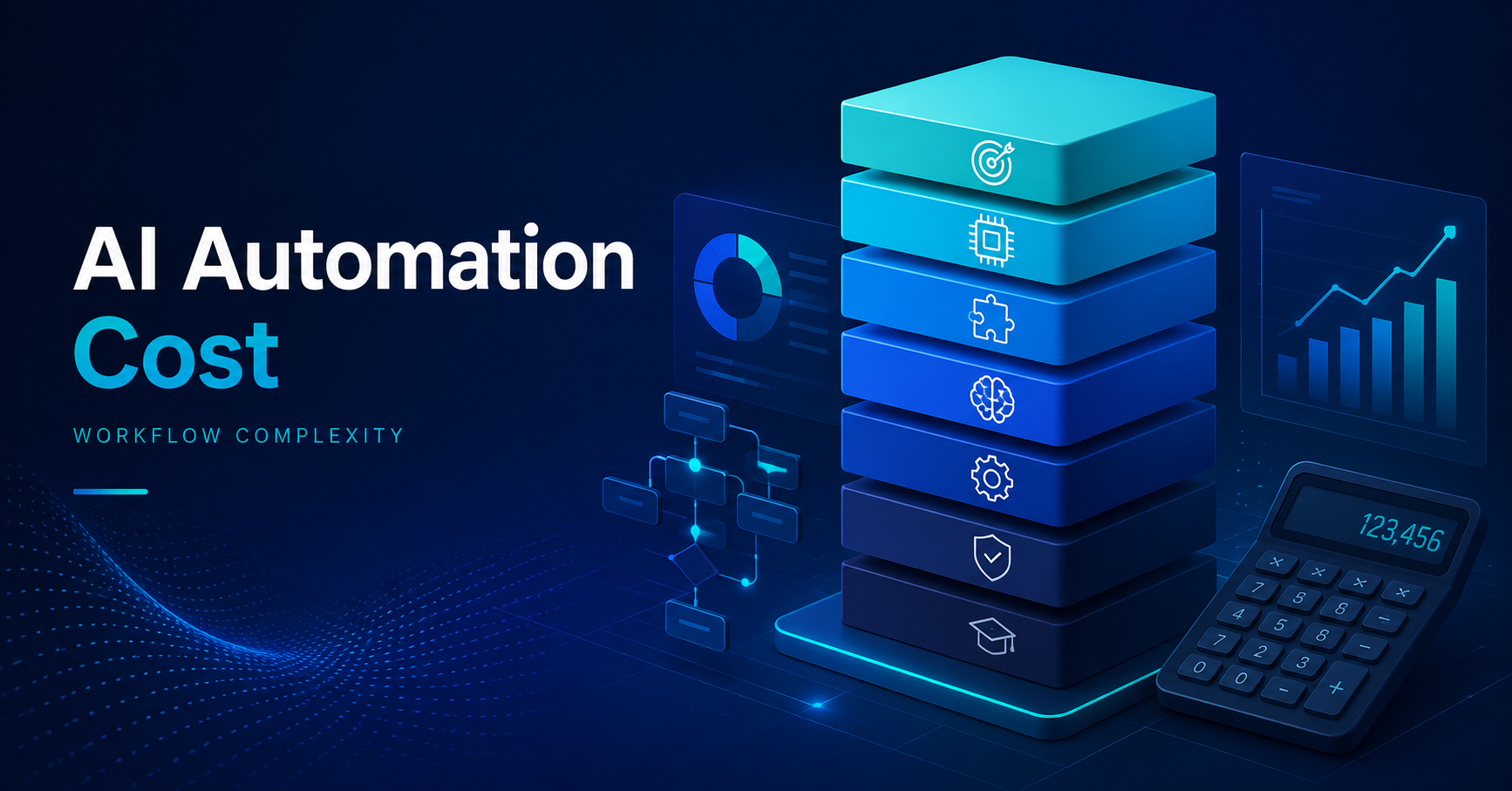
AI automation cost can range from a small workflow build to a major systems initiative. The better way to budget is not by company size or the number of AI features, but by workflow complexity, integrations, data quality, exceptions, and required oversight.
This guide gives you a practical way to estimate the investment before you start comparing proposals.
Key Takeaways
- Budget AI automation by workflow complexity, not by the size of your company or the number of tools involved.
- Separate implementation cost from recurring software, AI usage, monitoring, maintenance, and human review.
- Start with one measurable workflow, prove the economics, then expand after the automation is stable.
How Much Does AI Automation Cost? A Practical Planning Range
There is no single reliable price because workflows that sound similar can require very different levels of design, integration, testing, and support.
For early budgeting, use these four planning bands rather than treating them as fixed market prices:
- Simple workflow: $1,500 to $5,000. One narrow process, a few standard tools, structured data, limited branching, and little custom development.
- Moderate workflow: $5,000 to $15,000. Several steps, multiple systems, AI classification or generation, conditional logic, and some human review.
- Complex workflow: $15,000 to $50,000. Connected workflows, custom integrations, messy data, many exceptions, monitoring, and business-critical logic.
- Advanced or enterprise program: $50,000+. Cross-department automation, legacy systems, governance requirements, high volume, or custom infrastructure.
These are budgeting envelopes, not vendor quotes. They help you estimate the right order of magnitude before a proposal sets the anchor.
What Actually Drives AI Automation Cost?
The cost of automation rises when the workflow becomes harder to understand, connect, test, and maintain. AI itself may be only one part of the budget.
Integrations
Connecting two modern cloud tools through standard APIs is very different from connecting a CRM, ERP, database, payment system, and legacy application.
More systems mean more authentication, data mapping, testing, error handling, and maintenance. Poor APIs or undocumented software increase the work further.
Data quality
If customer records are duplicated, documents are inconsistent, or required fields are missing, the automation becomes harder to trust.
Cleaning and standardizing data can become a meaningful part of AI automation implementation cost.
Decision logic and exceptions
A trigger followed by one action is simpler than a process containing routing rules, approvals, retries, escalation paths, and several possible outcomes.
You also need a plan for uncertain AI outputs, missing information, system failures, and cases that still require human judgment.
AI responsibility
Some automations only move data. Others classify messages, summarize documents, extract information, score leads, draft responses, or recommend actions.
More judgment usually means more testing, guardrails, fallbacks, and human review.
Security and reliability
Internal reporting does not need the same controls as automation touching contracts, customer data, financial records, or regulated information.
Permissions, audit logs, monitoring, recovery procedures, and uptime requirements can push a project into a higher tier.
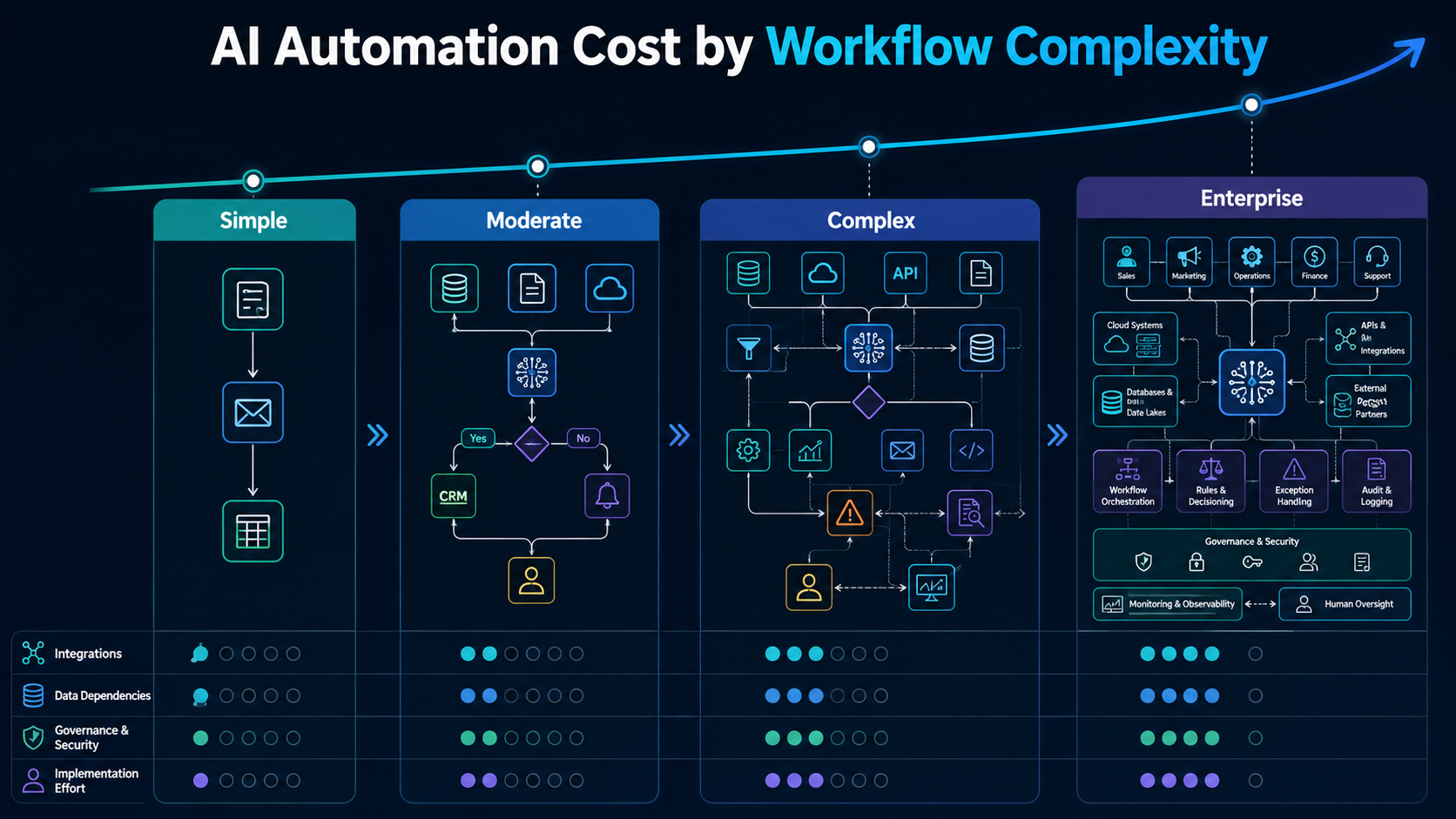
AI Automation Cost by Workflow Complexity
Classify the workflow before discussing tools. This gives you a more useful starting budget.
Level 1: Simple automation
A simple project has one clear trigger, a short sequence of actions, structured inputs, and standard integrations.
Examples include sending a follow-up after a form submission, moving records into a CRM, generating a routine summary, or notifying a team when a defined event occurs.
A $1,500 to $5,000 planning band can fit this type of narrow build. If rules can solve the problem reliably, adding AI may increase cost without improving the result.
Level 2: Moderate AI workflow
Moderate workflows contain several steps and require some interpretation.
A lead workflow might enrich a record, categorize the inquiry, apply qualification rules, update the CRM, draft a response, and send uncertain cases to a salesperson.
A $5,000 to $15,000 planning band gives room for integration work, AI testing, conditional logic, documentation, and launch support.
Level 3: Complex multi-system automation
Complex workflows cross systems or departments. They may use unstructured documents, custom APIs, several data sources, real-time decisions, or large exception trees.
The automation now behaves more like an operational system that needs monitoring, ownership, documentation, and recovery procedures.
A $15,000 to $50,000 planning band is more realistic when several of those requirements appear together.
Level 4: Advanced or enterprise automation
Enterprise complexity comes from architecture and risk, not employee count. A smaller company with legacy software and sensitive data can still have an enterprise-level workflow.
Projects may involve several departments, custom infrastructure, strict permissions, audit logs, high transaction volume, testing environments, and ongoing support.
At that point, budgeting often starts at $50,000 and can rise substantially with scope. Treat it as a phased program rather than one large automation request.
What the True Cost of Automation Includes
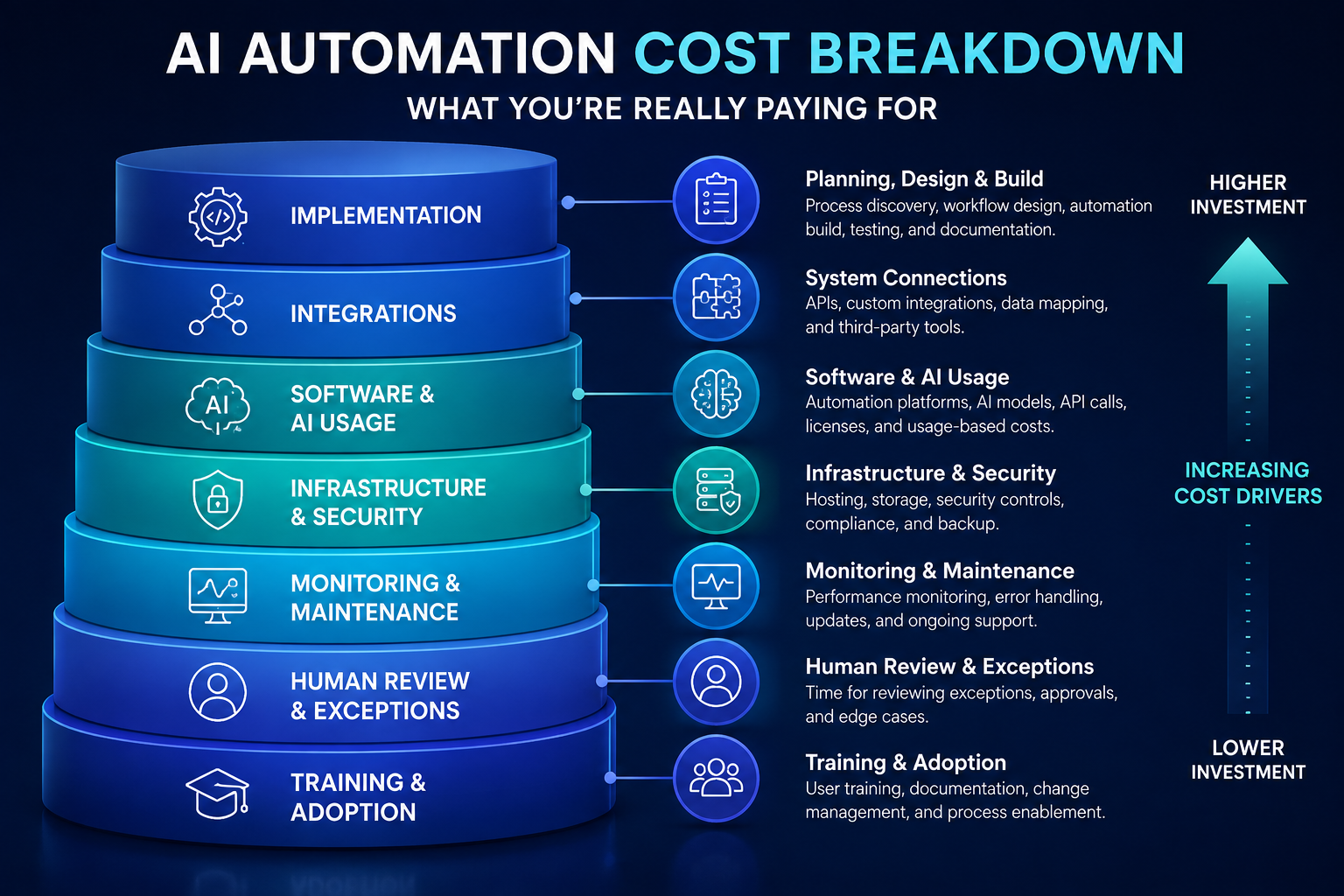
A common mistake is comparing only the implementation quote. The better number is the first-year and ongoing total cost of ownership.
Initial costs
Budget for process discovery, workflow design, integrations, data preparation, AI configuration, testing, documentation, security review, and training.
A cheap proposal can become expensive if these appear later as change requests.
Recurring costs
After launch, you may pay for automation software, model or API usage, databases, hosting, third-party services, monitoring, and support.
Usage-based expenses become more important as workflow volume grows.
Maintenance and internal effort
Processes, APIs, data structures, and exceptions change. Budget for troubleshooting, updates, optimization, and performance reviews.
Your own team also spends time explaining the process, testing edge cases, reviewing outputs, and handling exceptions. That effort belongs in the business case too.
AI Automation Cost for Small Business vs. Enterprise
AI automation cost for small business is often lower because the workflow can be narrower and the technology stack simpler. A service company may automate lead follow-up across a form, CRM, email tool, and calendar without custom infrastructure.
Enterprise projects become more expensive when they require more systems, departments, permissions, environments, governance controls, and stakeholders.
The useful distinction is architectural complexity. A small company should not buy enterprise architecture for a simple process, and an enterprise should not underbuild a business-critical cross-system workflow to save on software fees.
How AI Automation Agency Cost Is Usually Structured
When comparing an AI automation agency cost, separate the pricing model from the scope. A low monthly fee can become expensive over time, while a larger fixed project can be economical if it includes the complete build and handoff.
Common structures include:
- Fixed project pricing: best when scope, deliverables, timeline, and acceptance criteria are clear.
- Hourly consulting: useful for discovery, troubleshooting, or uncertain technical work.
- Monthly retainer: useful for continuous optimization, maintenance, and new workflow development.
- Productized automation: useful when your process closely matches a repeatable template.
Ask what is included after launch. Monitoring, documentation, support windows, account ownership, software subscriptions, and change requests can matter as much as the headline fee.
A 7-Step Framework for Building Your AI Automation Budget
A cost-effective AI automation project starts with a measurable process, not a tool demonstration.
1. Define one workflow
Write down the exact starting event and desired outcome. “Improve sales operations” is too broad. “Qualify inbound leads and route them to the correct owner” is budgetable.
2. Measure the current process
Record volume, time per task, employee involvement, errors, delays, and rework. These numbers create the baseline for a cost-benefit analysis of AI automation.
3. Map every required system
List the tools that provide inputs, receive outputs, store records, or trigger approvals. Identify which connections use standard APIs and which need custom work.
4. Count exception paths
Ask what happens when information is missing, the AI is uncertain, a system is unavailable, or a customer needs special treatment.
Exceptions are often a better complexity signal than the number of steps.
5. Assign a complexity level
Use the four levels above as an initial budget filter. If several risk factors appear together, move the project up a tier instead of forcing it into a cheaper estimate.
6. Calculate first-year ownership cost
Add implementation, subscriptions, usage, hosting, maintenance, internal review, training, and expected support.
7. Compare cost with measurable value
Estimate hours saved, capacity released, errors reduced, response time improved, or outside spend avoided. AI automation cost savings should come from measurable workflow changes, not vague productivity promises.
Example: One Lead Workflow, Two Different Budgets
Imagine two companies both want to automate lead qualification. The business objective sounds identical, but the architecture is not.
Company A receives website forms in one system. The automation enriches the record, classifies the inquiry, updates the CRM, sends a notification, and asks a salesperson to review uncertain leads.
That fits a moderate workflow and could be planned within the $5,000 to $15,000 envelope.
Company B receives leads from websites, partners, chat, events, and paid campaigns. The system must deduplicate records, combine CRM history, apply territory rules, assess multilingual messages, route enterprise accounts differently, log decisions, and recover from failures.
That version can move into the $15,000 to $50,000 complexity band before additional enterprise requirements are added.
The goal is the same. Workflow architecture creates the cost difference.
How to Reduce AI Automation Cost Without Underbuilding
Start with one workflow instead of an entire department. Standardize the process before automating it. Clean the data the workflow depends on. Prefer existing APIs over custom connections where practical.
Keep human approval for rare or high-risk cases rather than building complex logic for every exception. Separate must-have requirements from phase-two ideas and define acceptance criteria before development starts.
Do not add AI where normal workflow automation can solve the problem reliably. The most cost-effective AI automation may use AI only at the steps that genuinely require interpretation.
When the Automation Is Not Worth the Cost
Be cautious when a process rarely occurs, changes every few weeks, requires deep human judgment, depends on inaccessible systems, or has no measurable baseline.
In those cases, fixing or standardizing the process may create more value than automating it.
Budget the Workflow Before You Buy the AI
The useful question is not only “how much does AI automation cost?” It is “what level of workflow complexity are we asking someone to build and operate?”
Map the process, integrations, data, exceptions, oversight, and first-year ownership cost before comparing proposals. That gives you a budget you can defend and makes under-scoped or overbuilt solutions easier to spot.
Rank Boost's AI automation services can help businesses identify practical automation opportunities, map the systems involved, and scope implementation around measurable workflows before adding unnecessary complexity.