
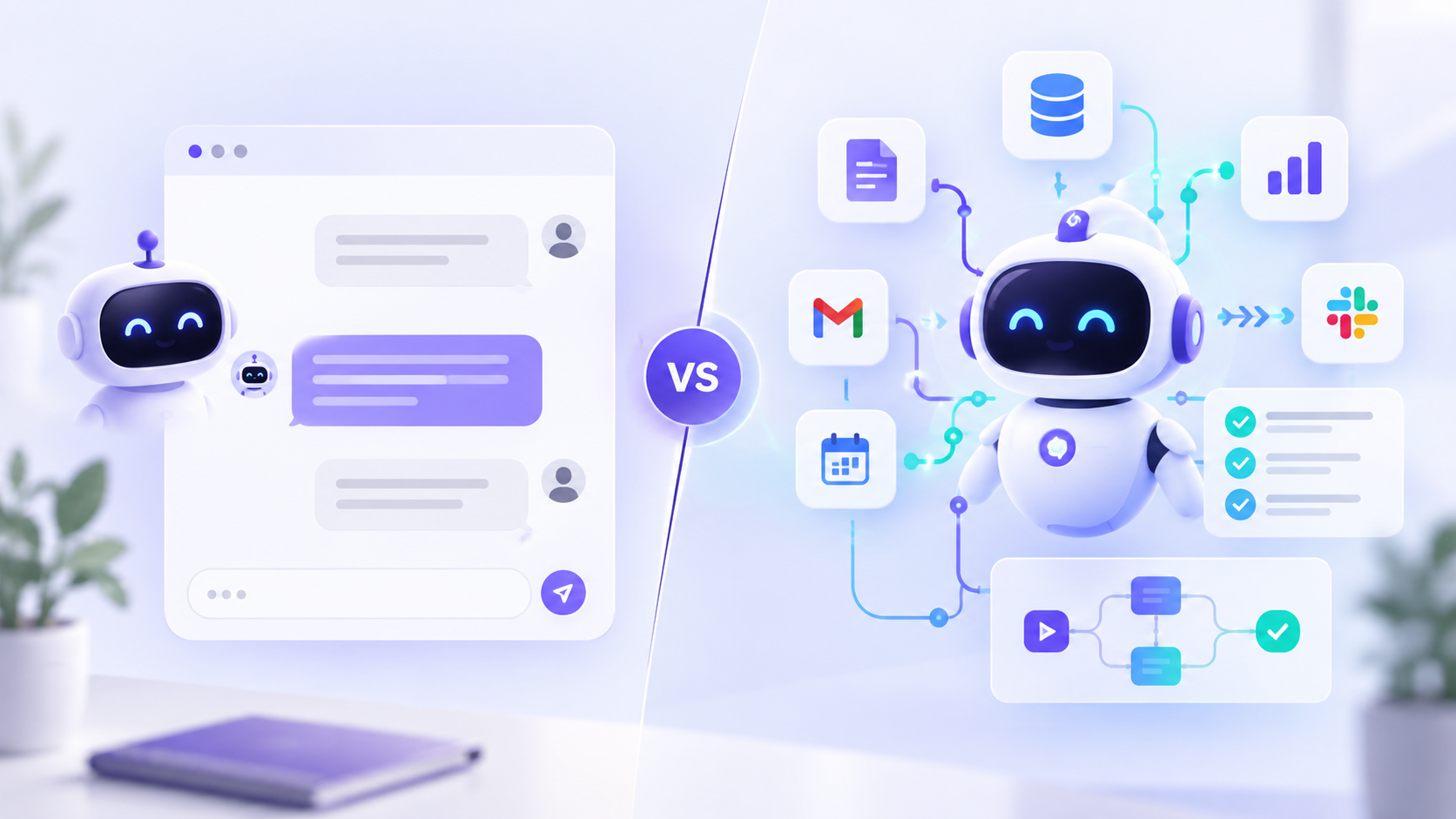
AI agents and chatbots can look very similar from the user's side.
Both may appear as a chat window. Both can understand natural-language requests. Both may use large language models. And both can connect with business information.
The difference becomes clearer when you look at what happens after the conversation starts.
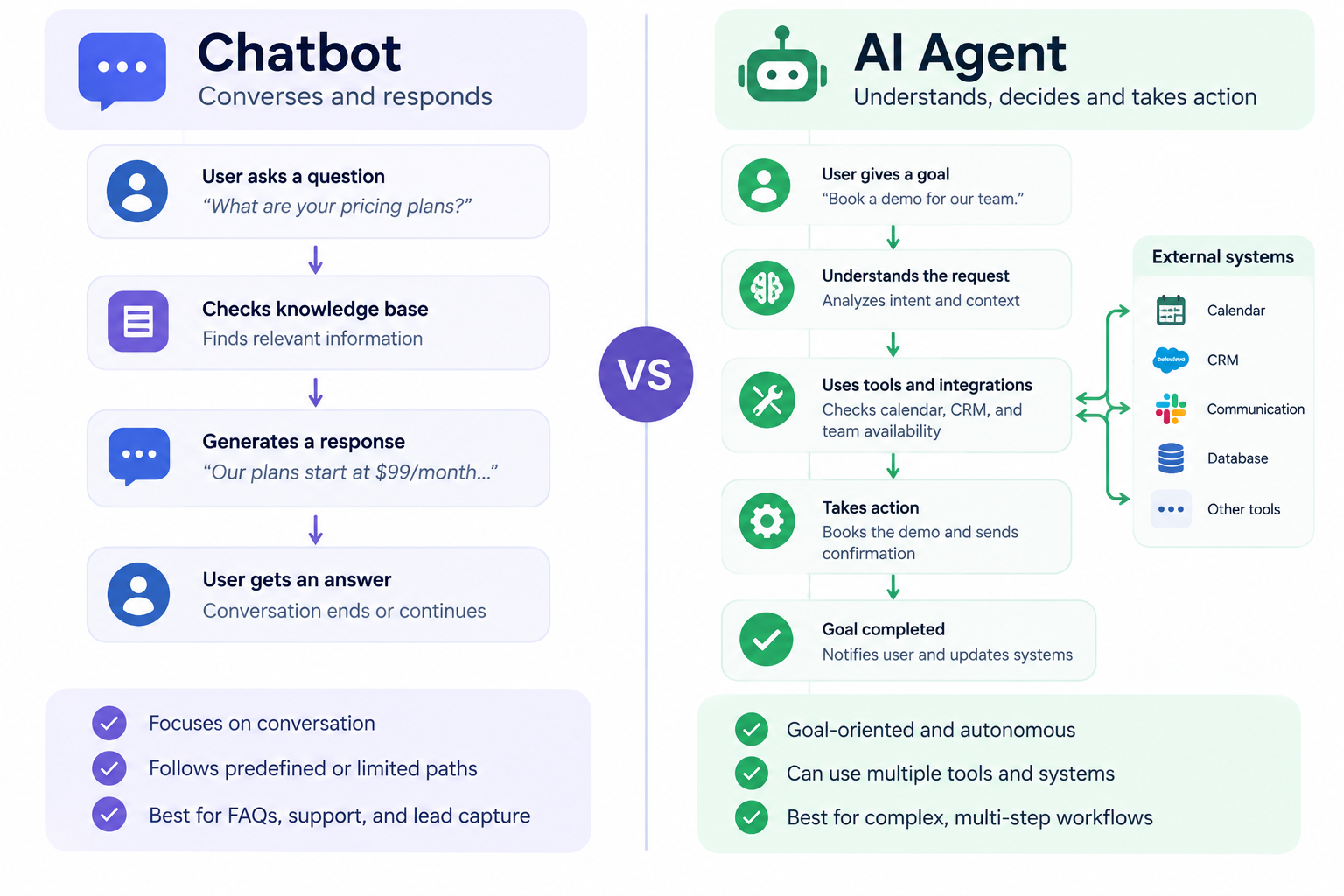
A chatbot is primarily designed to communicate with a user and respond to requests. An AI agent is designed to pursue a goal, decide what steps are required, use connected tools, and potentially take actions across multiple systems.
That distinction matters because adding more AI does not automatically make an application an agent. OpenAI's agent guidance, for example, separates agents from simple LLM applications based on whether the system can independently manage workflow execution and use tools to complete tasks.
So when comparing an AI agent vs chatbot, the most useful question is not:
“Which one uses better AI?”
It is:
Does the system mainly need to answer, or does it need to decide and act?
What Is a Chatbot?
A chatbot is software designed primarily for conversational interaction.
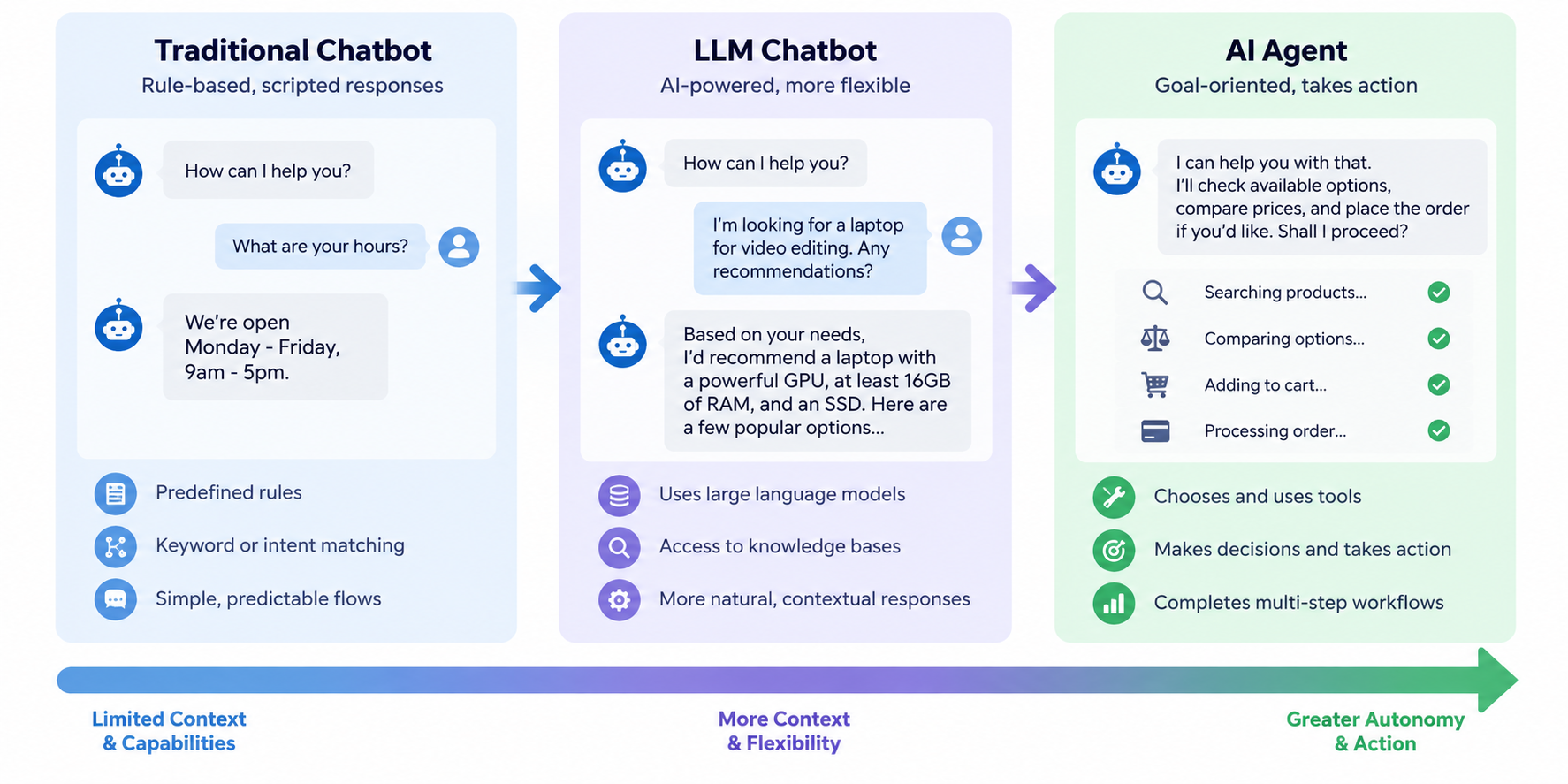
Traditional chatbots usually rely on predefined rules, decision trees, keywords, or intent matching. A customer asks a question, the chatbot identifies what the user wants, and it follows an established response path.
Examples include:
- Answering store-hour questions
- Showing order-status information
- Guiding users to support resources
- Collecting lead information
- Booking an appointment
- Routing a customer to the right department
Modern AI chatbots can be considerably more capable.
Instead of requiring users to follow rigid menus, an AI chatbot may use a large language model, natural language processing, retrieval systems, and company knowledge to understand more flexible questions and generate contextual responses.
This is why the line between chatbot and AI agent is becoming less obvious.
A modern chatbot may remember the current conversation, search a knowledge base, create CRM records, or trigger a predefined workflow. That still does not necessarily make it an autonomous AI agent.
The important difference is who controls the workflow.
If the application's primary job remains conversational and its available actions follow tightly defined paths, it is generally still functioning as a chatbot.
Salesforce, Rasa, and other platforms similarly distinguish conversational systems from agents based heavily on autonomy, reasoning, workflow execution, and system access.
For businesses that primarily need conversational automation, RankBoost's AI chatbot development services can be built around customer support, lead generation, CRM connections, and website interactions.
What Is an AI Agent?
An AI agent is a goal-oriented software system that can use AI to determine how to complete a task.
Rather than simply responding to one prompt at a time, an agent can potentially:
- Understand the objective
- Gather relevant information
- Decide what to do next
- Choose between available tools
- Perform an action
- Check the result
- Continue until the task reaches an appropriate outcome
- Escalate to a human when necessary
OpenAI describes agents as systems capable of independently accomplishing tasks on a user's behalf and highlights three important building blocks: models, tools, and instructions or guardrails.
Imagine a new prospect submits this request:
“We have five locations and need help improving local search visibility.”
A chatbot might:
- Answer questions about local SEO.
- Ask for the prospect's contact information.
- Send the information into a CRM.
- Tell the visitor that someone will follow up.
An AI agent could potentially go further:
- Understand the prospect's request.
- Collect their website and locations.
- review approved business criteria.
- Qualify the lead.
- Research relevant account information.
- Update the CRM.
- Assign the correct salesperson.
- Draft a personalized follow-up.
- Request human approval if needed.
- Trigger the next approved workflow.
The conversation may look similar to the customer, but the underlying system is performing a much broader workflow.
Businesses that need this type of automation can explore RankBoost's AI agent development services.
AI Agent vs Chatbot: What Are the Main Differences?
Here is a practical comparison.
|
Capability |
Chatbot |
AI Agent |
|
Primary purpose |
Conversation |
Goal completion |
|
Typical behavior |
Responds to requests |
Reasons, decides, and acts |
|
User prompt required |
Usually |
Not necessarily for every step |
|
Workflow |
Predefined or narrowly bounded |
Can dynamically determine next steps |
|
Tool access |
Limited or predefined |
Can select and use multiple tools |
|
External actions |
Usually simple |
Can execute multi-step actions |
|
Memory |
Often session-based |
Can use broader state or persistent memory |
|
Integrations |
Knowledge bases, APIs, CRM |
APIs, databases, CRM, email, workflows, internal systems |
|
Decision-making |
Limited |
Greater contextual decision-making |
|
Risk level |
Usually lower |
Potentially higher because it can take actions |
|
Governance needs |
Moderate |
Strong permissions, monitoring, guardrails, and approvals |
|
Best for |
FAQs, support, lead capture |
Multi-step business workflows |
The exact boundary varies by product. Some systems marketed as chatbots now offer agent-like features, while some products marketed as AI agents are mainly conversational interfaces.
Quickchat's 2026 analysis makes this distinction especially useful by separating rule-based chatbots, LLM chatbots, and AI agents instead of treating every conversational system as one of only two categories.
How Does Autonomy Differ Between AI Agents and Chatbots?
Autonomy is one of the biggest differences.
A chatbot normally waits for input:
User → Request → Response
An agent can operate more like:
Goal → Analyze → Choose Tool → Act → Check Result → Continue or Escalate
For example, imagine a customer reports that an order is missing.
A chatbot could search a support database and explain the company's missing-order policy.
An agent could potentially:
- Retrieve the customer's order
- Check shipping data
- Determine whether the order qualifies for escalation
- Open a support ticket
- Update the CRM
- Notify the correct employee
- Send an approved customer update
The important distinction is not simply that the agent provides a better answer.
The agent can move the workflow forward.
Make similarly describes the practical difference in terms of whether a system only responds or can inspect its environment, choose tools, and perform changes in connected systems.
How Do Tool Use and Integrations Differ?
Both technologies can integrate with external systems.
The difference is usually how those integrations are used.
A chatbot might connect with:
- Website content
- FAQ databases
- Product information
- CRM forms
- Calendars
- Support systems
Its integrations usually support the immediate conversation.
An AI agent may connect with:
- CRMs
- Email platforms
- Databases
- Project-management systems
- Ecommerce platforms
- Analytics tools
- Internal APIs
- Automation platforms
- Communication software
- Other AI agents
More importantly, the agent can potentially choose which tool to use as the workflow develops.
OpenAI's agent framework, for example, distinguishes between tools for retrieving data, tools that perform actions, and other agents that can participate in orchestration.
How Is Memory Different in a Chatbot vs AI Agent?
Memory is another useful distinction, although it is not absolute.
Traditional chatbots often maintain enough context to complete the current conversation.
Modern AI chatbots may maintain much richer conversational context and retrieve customer or company information when needed.
Agents may go further by maintaining workflow state across multiple steps or sessions.
An agent might need to remember:
- What task it is trying to complete
- Which actions have already been taken
- Which tools returned results
- What information remains missing
- Whether human approval has been received
- Where execution should continue
Rasa highlights longer-term context and multi-session workflow continuity as one area where agent systems can differ from simpler conversational applications.
When Should You Use a Chatbot?
Choose a chatbot when the business problem is primarily conversational.
Typical chatbot use cases include:
Customer FAQs
Questions about:
- Opening hours
- Services
- Shipping
- Pricing
- Return policies
- Product information
Website Lead Capture
A chatbot can ask visitors:
- What service they need
- Their company size
- Their website
- Their contact information
- When they want to start
It can then send the structured information into your CRM.
Appointment Booking
A chatbot can gather the required information and connect visitors to an approved booking workflow.
Customer Support Triage
The chatbot can identify the issue, answer common questions, or route complex cases to the correct human.
Product or Service Discovery
Instead of making visitors search through numerous pages, the chatbot can ask questions and guide them toward relevant services or products.
Chatbots are particularly useful when interactions are high-volume, predictable, and relatively low risk. ServiceNow lists support questions, FAQs, booking, routine IT requests, and appointment management among common chatbot applications.
When Should You Use an AI Agent?
AI agents become more useful when the goal requires several decisions or systems.
Examples include:
Lead Qualification and Follow-Up
An AI sales agent could:
- Review new leads
- Gather account information
- Qualify them against business rules
- Update CRM records
- Prepare personalized follow-ups
- Notify sales representatives
Customer Issue Resolution
Instead of only telling a customer what to do, an agent could gather account information, inspect connected systems, determine the appropriate workflow, execute approved actions, and escalate exceptions.
Marketing Operations
An agent could help coordinate:
- Campaign research
- Audience analysis
- Content workflows
- CRM data
- Reporting
- Campaign follow-ups
SEO Workflows
An AI agent could assist with:
- Keyword monitoring
- Competitor research
- Search-performance analysis
- Content opportunities
- SEO reporting
- Recurring website checks
Internal Operations
Agents can also support employees by gathering information from several systems, preparing reports, routing requests, or coordinating repeatable internal processes.
The common pattern is multi-step work requiring context and action, not simply conversation.
Is an AI Agent Always Better Than a Chatbot?
No.
More autonomy also creates more responsibility.
Giving software permission to answer a question is different from giving it permission to:
- Send an email
- Change a CRM record
- Issue a refund
- Modify customer information
- Publish content
- Update inventory
- Trigger another workflow
An agent therefore requires stronger controls around permissions, observability, testing, error handling, and human approval.
Make points out that agent projects introduce additional requirements such as permissions, rollback logic, auditability, and approval design because failures can create actions rather than simply poor responses.
Organizations deploying higher-impact AI systems should also consider formal AI governance and risk-management practices. The NIST AI Risk Management Framework provides a voluntary framework for managing AI risks across organizations.
A chatbot may therefore be the better solution when the job is narrow, predictable, and primarily informational.
Can a Chatbot Become an AI Agent?
Sometimes, but adding a larger language model alone is not enough.
Think of the technologies as a spectrum:
Rule-Based Chatbot → LLM Chatbot → Tool-Enabled Assistant → AI Agent
A chatbot becomes more agent-like as you add capabilities such as:
- Tool selection
- Workflow state
- Planning
- External actions
- Dynamic decision-making
- Persistent memory
- Feedback loops
- Human approval
- Multi-step execution
Eventually, enough architectural changes may mean you are no longer simply upgrading a chatbot. You are building an agent.
That is why evaluating a product only by whether the vendor calls it a “chatbot” or an “agent” can be misleading.
Look at what the system can actually do.
How Should You Choose Between an AI Agent and Chatbot?
Start with the workflow rather than the technology.
Ask these questions.
Does the system mainly need to answer questions?
If yes, start with a chatbot.
Does it need to complete actions in other systems?
If yes, you may need agent capabilities or a connected automation workflow.
Does the process require several decisions?
Multi-step, context-dependent decisions are better candidates for an agent.
Are the rules completely predictable?
If a deterministic workflow can reliably solve the problem, traditional automation may be simpler than an AI agent.
OpenAI similarly recommends focusing agent development on workflows involving difficult decisions, complex rule sets, or significant unstructured information rather than using agents where deterministic automation already works well.
What happens if the AI makes the wrong decision?
The higher the consequence, the stronger your permissions, approvals, testing, monitoring, and fallback procedures should be.
Does a human need to approve important actions?
Agent workflows do not need to mean full autonomy.
A practical architecture can be:
AI gathers information → AI recommends action → Human approves → Automation executes
Are you automating a conversation or a business process?
This may be the simplest decision rule of all:
Conversation-first problem → chatbot
Goal-and-action-first problem → AI agent
Can You Use AI Agents and Chatbots Together?
Yes, and many businesses may ultimately use both.
The chatbot can provide the conversational interface while an AI agent or automation workflow handles more complicated work behind it.
For example:
A website chatbot asks:
“How can we help?”
The customer explains that they need to reschedule a service appointment.
The chatbot understands the request.
Behind the interface, an agent could:
- Retrieve the customer record.
- Check the current appointment.
- Query available scheduling options.
- Apply relevant business rules.
- Offer valid alternatives.
- Update the scheduling system after confirmation.
- Send the confirmation.
- Update the CRM.
From the customer's perspective, it is one conversation.
From the business's perspective, several connected systems may have been coordinated.
This hybrid architecture avoids forcing every problem into either a “chatbot” or “AI agent” category.
Start With the Business Problem, Not the AI Label
The AI agent vs chatbot decision becomes much easier when you stop comparing product labels and start examining the workflow.
Use a chatbot when your primary objective is to communicate, answer questions, collect information, or guide users through a predictable process.
Consider an AI agent when the system needs to understand a goal, make decisions, choose tools, coordinate multiple steps, and take approved actions across your business systems.
And do not assume that maximum autonomy is the goal.
The best system is the one that automates the right amount of work while keeping humans involved where judgment, risk, or accountability requires them.
FAQs
What is the main difference between an AI agent and a chatbot?